

Description
TranslateRocket makes your site multilingual, and everything it does is free. No word limits, no charge per language, and nothing switched off to push you towards an upgrade — it is not a trimmed-down version of a paid plugin.
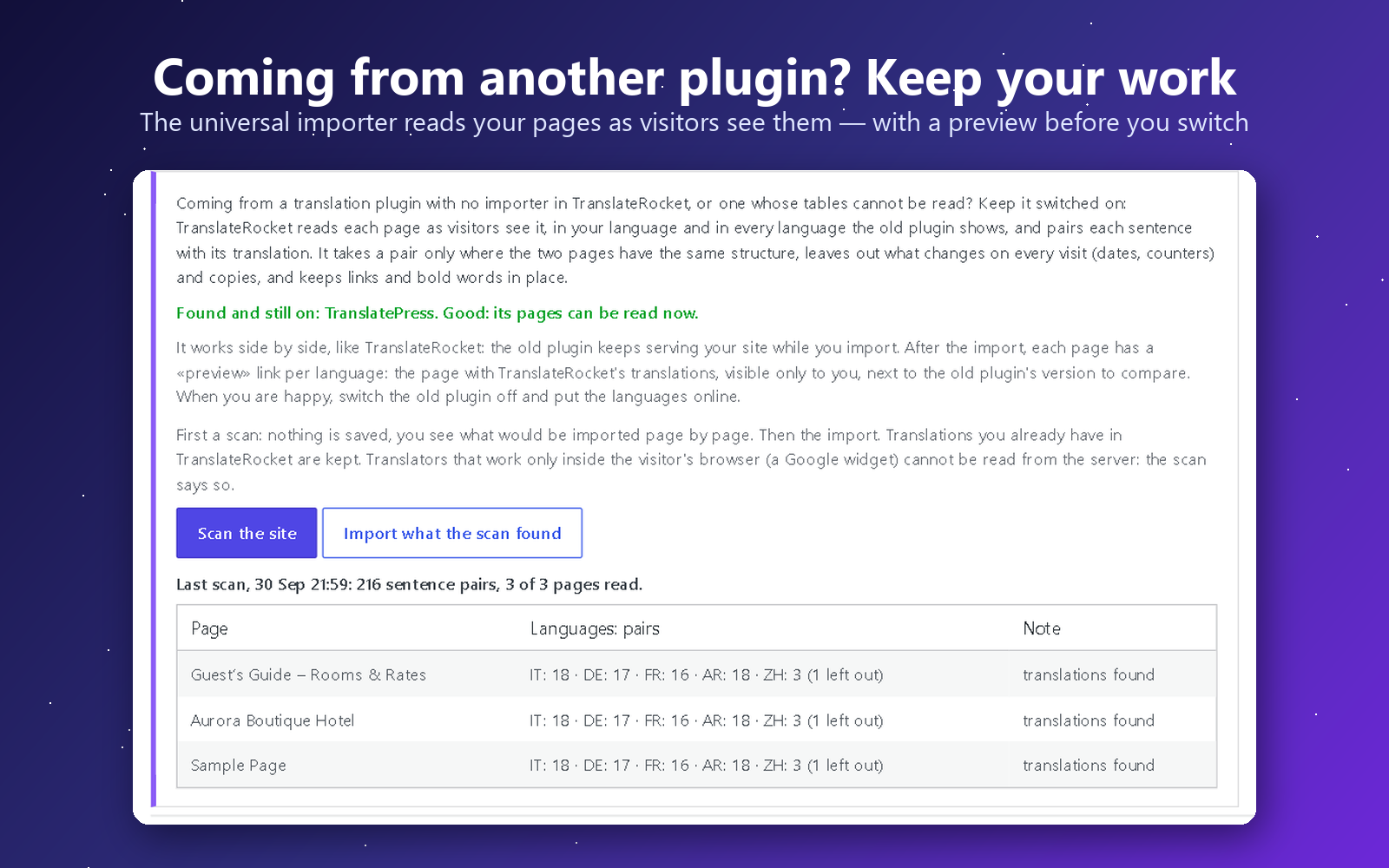
Already using WPML, Polylang, TranslatePress or Weglot? Try TranslateRocket next to it — your site does not change. Activate it alongside your current translation plugin: visitors keep seeing exactly the same site, while you import your translations, complete them and preview any page in any language as an administrator. When you are convinced, deactivate the old plugin and put TranslateRocket online with one click. Nothing of the other plugin is deleted, and switching it back on takes you straight back to where you started.
You do not need an API key at all. Chrome and Edge on a computer carry a translator that runs on the device itself, and TranslateRocket can drive it: install the plugin, pick your languages, press one button and the site is translated. It costs nothing, needs no account, and the text never leaves your machine. It is the fastest way to a translated site. When you want fluent, idiomatic copy, the same pages can go through DeepL or an AI model with your own key (OpenAI, Anthropic, Gemini — you pay the provider directly), through ChatGPT or Gemini with a ready-made prompt at no cost, or through your own hands, line by line — and everything already translated is kept, so nothing is ever done twice.
Switching from another translation plugin? Your existing translations come with you. One click imports everything you have already paid for or typed by hand — from TranslatePress, Polylang, WPML, Weglot, qTranslate (X and XT), WPGlobus, WP Multilang, Bogo, Multilanguage by BestWebSoft, Falang, Sublanguage, Loco Translate and Autoglot, plus CSV and TMX for anything else. Most are read straight from the tables, the posts or the files, so the import still works after the other plugin has been deactivated or even deleted — which is the usual state of a site that is moving on. Pages built with Elementor or Bricks come across too, widget by widget — their words live in a meta field, not in the page content, and most importers never look there.
It detects translatable text as you browse — visible text, link titles, image alt, placeholders, ARIA labels, page titles, meta descriptions and the social preview tags a SEO plugin adds (Open Graph, X) — and serves each language under its own clean URL prefix (/it/, /de/), friendly to SEO and to page caches.
You translate however you like:
- 🆓 In your browser, with no key — Chrome and Edge translate the whole page, or the whole site, on the device itself. Nothing to sign up for, nothing to pay, nothing sent anywhere. Available both on the live page and on the bulk screen.
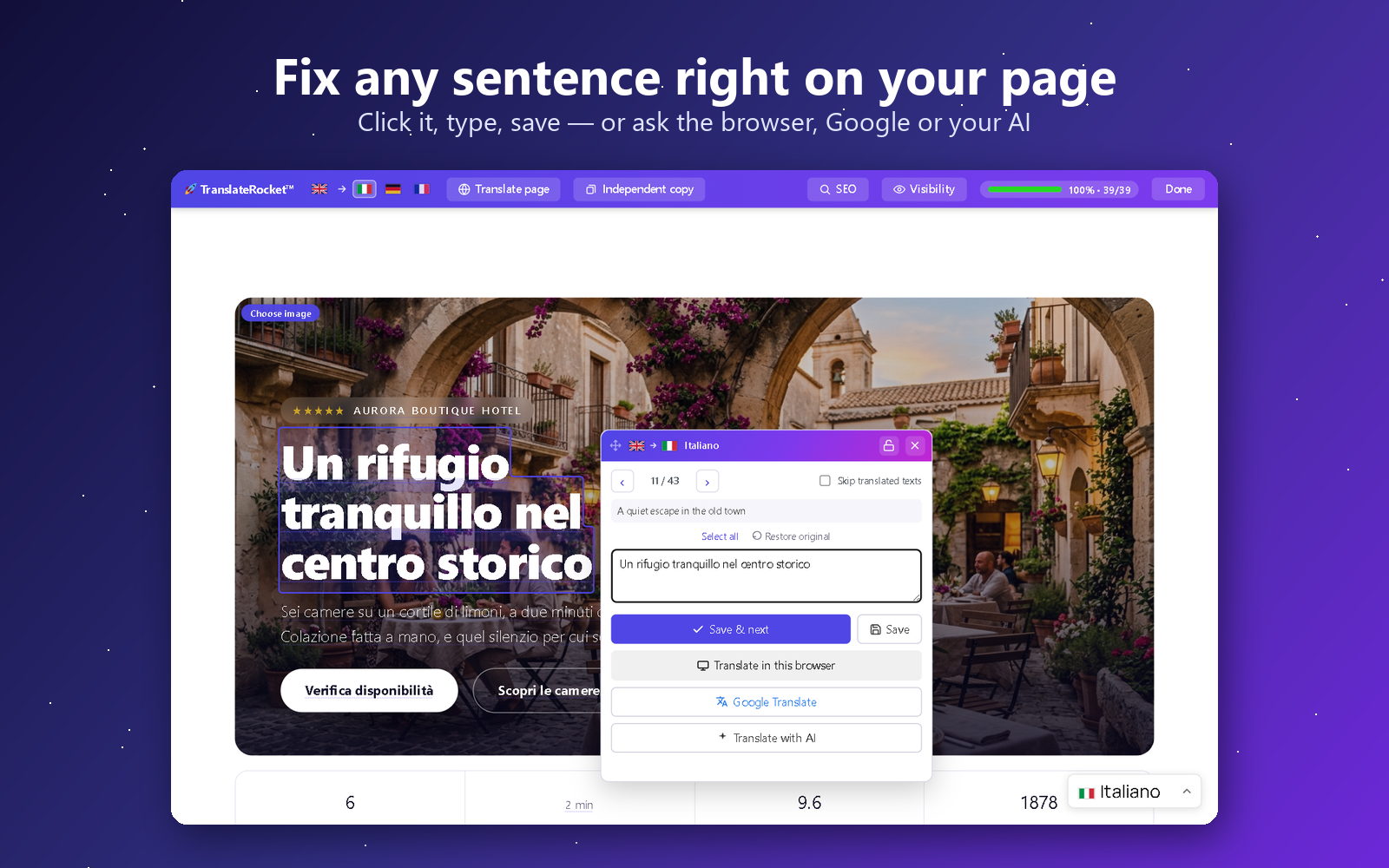
- 🖱️ On the live page — switch on the visual editor and click any text to translate it in a small, draggable popup, with Previous/Next, a progress bar and a “skip already-translated” mode.
- 🆓 Free with Google Translate (no key) — every field has a link that opens Google Translate prefilled, so you translate for free on Google’s own site and paste the result back.
- ✍️ By hand, in a clear per-page editor (also inside the post/page screen) with red highlighting for what’s still missing — plus a copy & paste box for bulk Google translation.
- 💬 With ChatGPT or Gemini, no key — one button copies the whole page with a translation prompt written for your site; paste the answer back and every line goes to its place.
- 🆓 With free AI, on your own free account — Cloudflare Workers AI (about 1,900 sentences a day with Llama 3.3 70B, or 11,000 with a plain translation model), Groq (gpt-oss-120b) or OpenRouter’s free models. A two-minute guide gets you the key, no card needed; a counter shows today’s free share, and when it runs out the next provider in your chain carries on.
- 🤖 With AI — bring your own key for DeepL, OpenAI, Google Gemini, Anthropic (Claude) or Google Cloud Translate. Text is sent only to the provider you choose, only when you ask.
Highlights
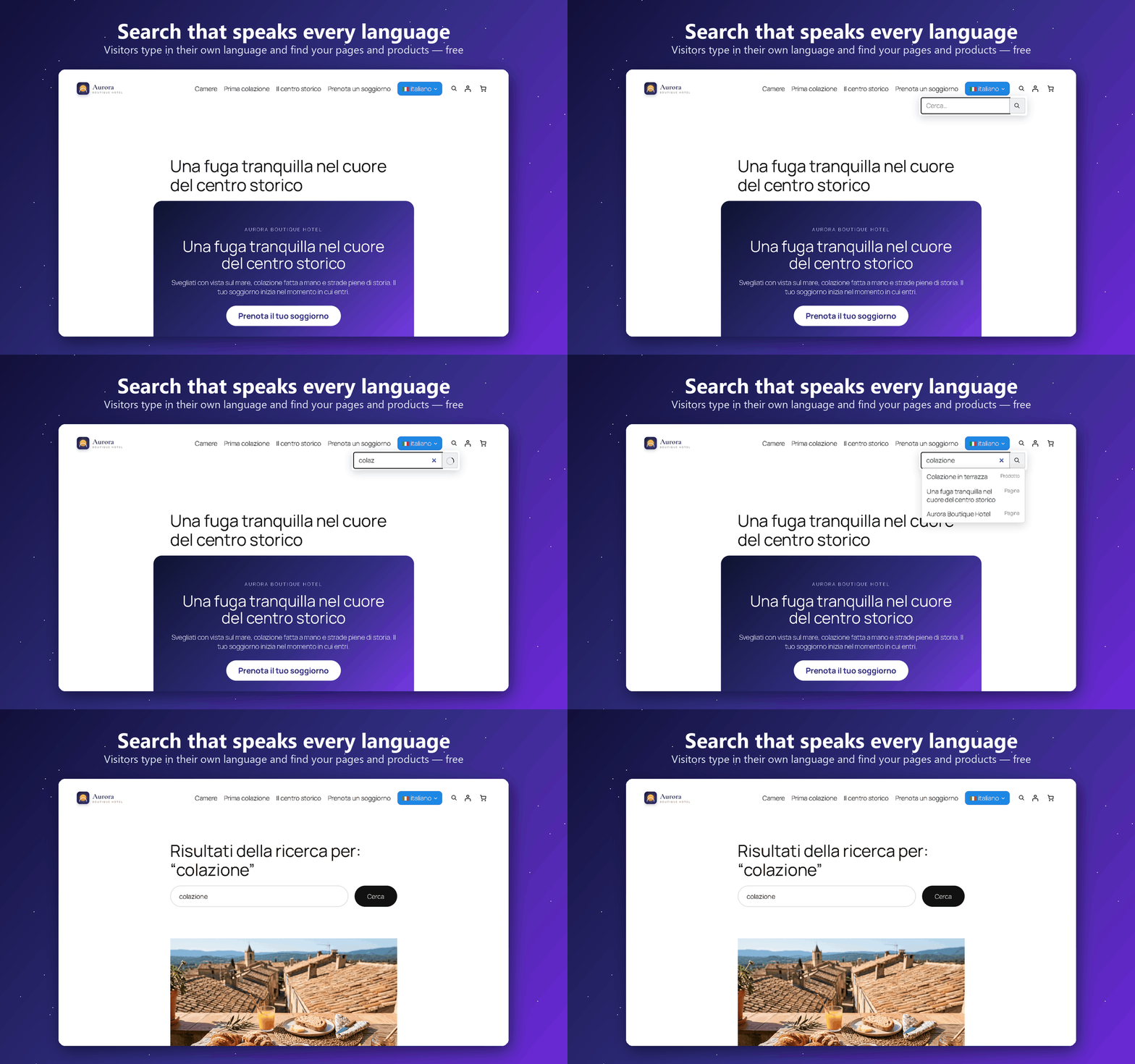
- 🔎 Search in every language, free — a search box that always searches in the language of the page: a visitor on
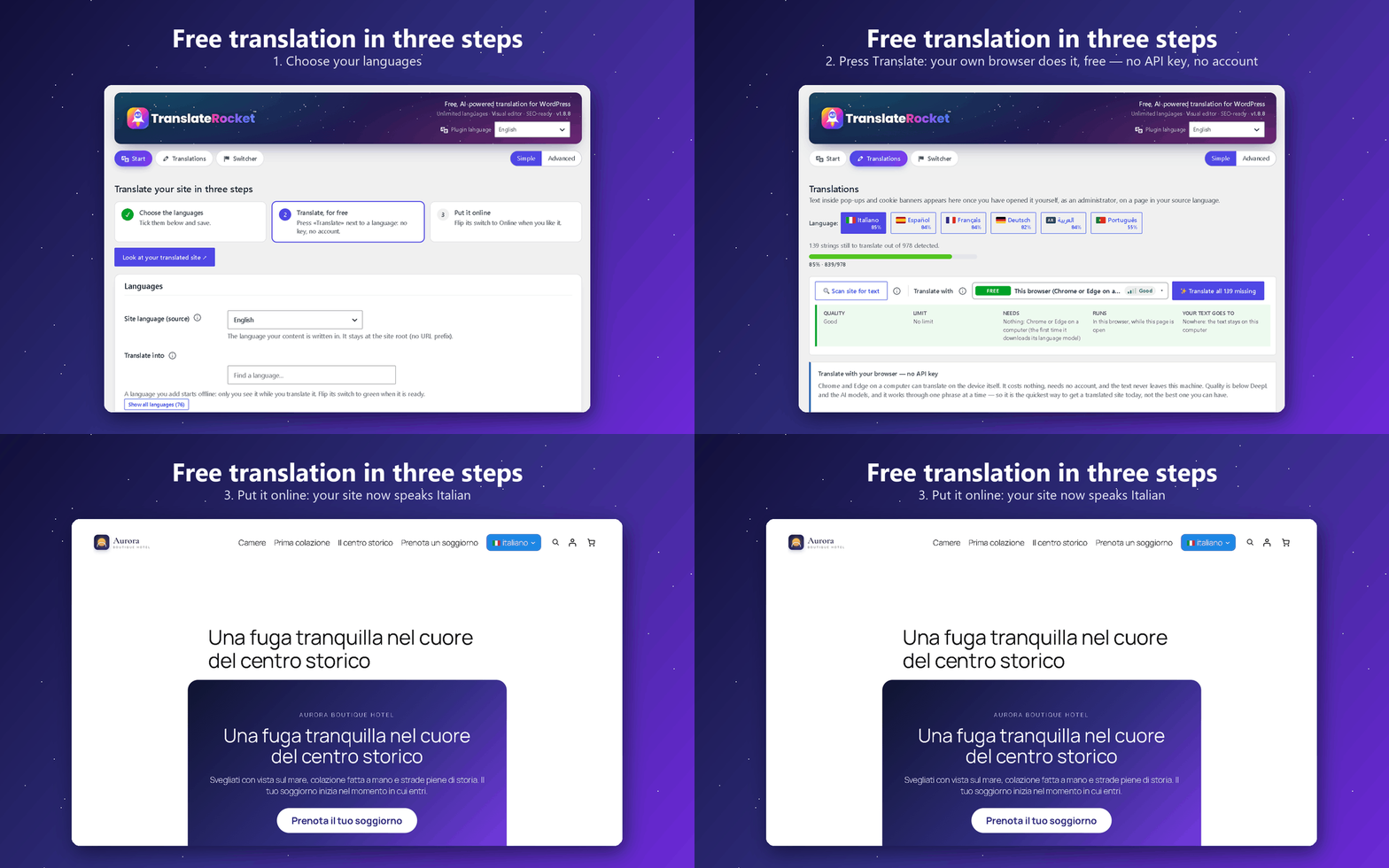
/it/types in Italian and finds your pages, posts and WooCommerce products by their translated title and text, with suggestions as they type. Make one profile for the header, one for the footer and one for the phone menu, each with its own look and a live preview; add it as a block, with the[translaterocket_search]shortcode or as an item of your menu. The site’s own search box, Ajax Search Lite and FiboSearch find translated text too. - 🟢 Simple view: translate a site in three steps — choose the languages, press «Translate», put each language online. Nothing to configure and no key: the free engines are already there. Everything else stays one click away under «Advanced», and nothing is ever removed.
- 🧠 Sentences an engine cannot translate are kept — a brand name, an address or a line already in another language stays as it is and the page still counts as complete, with a «translate again» button if you want to try another engine.
- 📊 Visits per language, without cookies — how many visits each language gets, its most read pages and the languages your visitors’ browsers ask for, so you know which language to translate next.
- 🍪 Cookie banners in the visitor’s language — Complianz, CookieYes, iubenda, Cookiebot and Usercentrics show their banner in the language of the page, and their legal texts are never machine-translated.
- 💳 Checkout and e-mails in the customer’s language — the WooCommerce checkout (Stripe tested), the order e-mails and the e-mails of form plugins (WPForms, Contact Form 7, Fluent Forms, Ninja Forms, Gravity Forms) reach each visitor in the language they used. WooCommerce lists TranslateRocket as compatible with High-Performance Order Storage and with the Cart and Checkout blocks.
- 🆓 Free AI on your own free account — Groq, Cloudflare Workers AI or OpenRouter’s free models, with a two-minute guide to the key and no card; and, with the free Labs add-on, MyMemory with no key at all (about 5,000 characters a day, about 50,000 with an e-mail address).
- 🔑 No API key required — and not just “by hand”. Chrome and Edge translate the whole site automatically, on your own computer, for free. Or do it by hand in the visual editor, or free with Google Translate, and edit any translation later. There is no signup, no account and no key to create — AI providers are optional and only used if you add one yourself.
- 🌍 Unlimited languages (36 built in), 100% free. Donations welcome, never required.
- ⚡ Built for huge sites: past ~20,000 strings the engine switches by itself to indexed per-page lookups — flat memory and the same render time at 500 or 500,000 strings (load-tested), where map-loading translation plugins hit the PHP memory limit.
- 🖱️ On-page visual editor: click text to translate it in a draggable popup — no admin round-trips.
- 🧩 Interface too: translates theme & plugin interface strings, not just page content.
- 🔗 SEO-ready URLs: translated slugs (e.g.
/it/chi-siamo/) andhreflangtags. - 🔍 One SEO panel with everything in it: open a page in the visual editor and the SEO panel lists, in order, the translated address, the page title, the meta description, the social preview (Open Graph and X), the keywords, then every image on the page and every translatable attribute — titles, placeholders, ARIA labels. Each line takes you straight to that element on the page and opens the right editor, so nothing search engines read is left in the source language by accident.
- 🚦 Per-page visibility: if a page has no equivalent in a language, redirect it, show a custom message, or 404 — per page, per language.
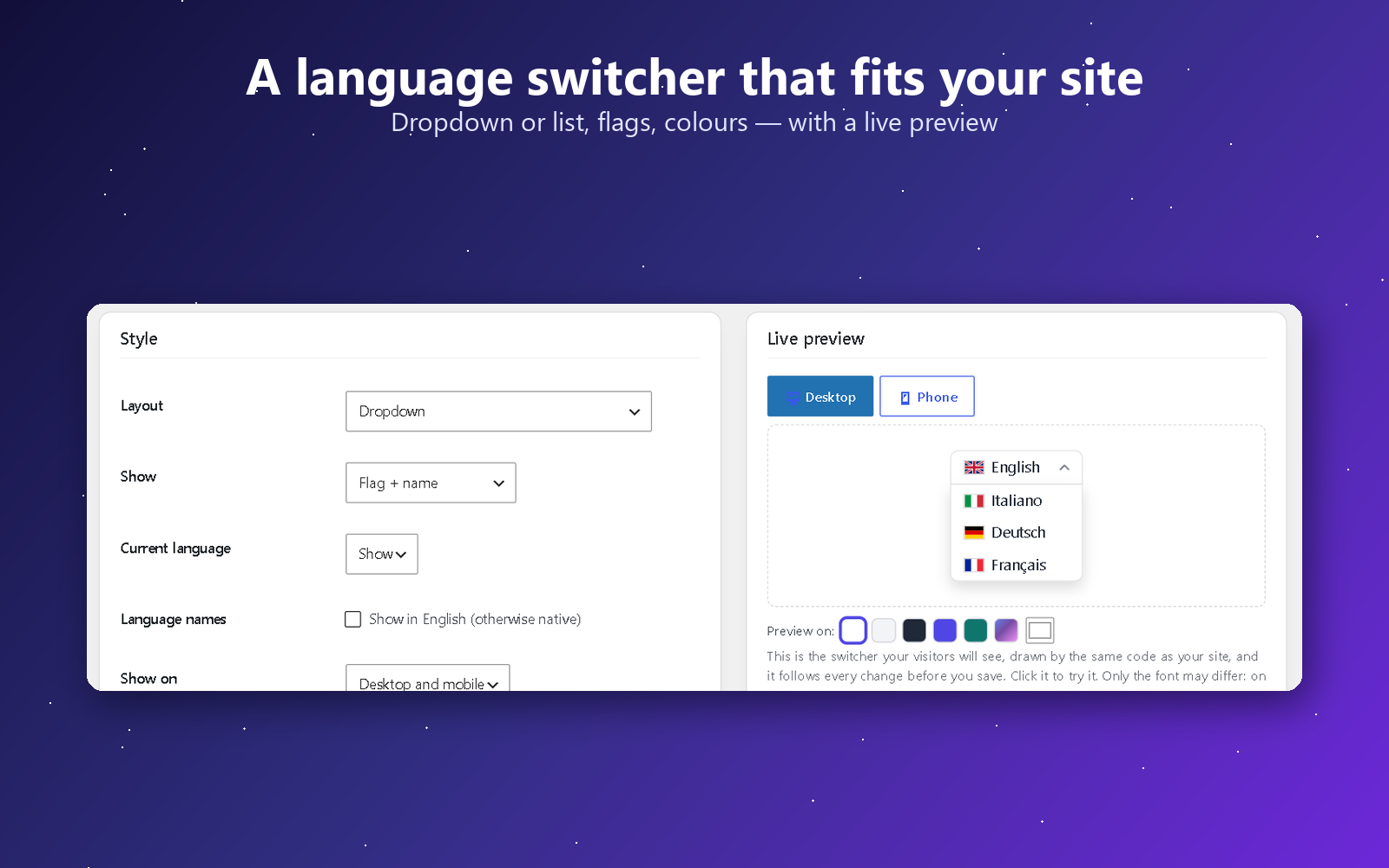
- 🎌 Flexible language switcher as a shortcode
[translaterocket_switcher], a Gutenberg block, or a widget — inline, dropdown, or a scrollable bar with ‹ › arrows for many languages — with original SVG flags that render everywhere (including Windows). Show a switcher on desktop only, on mobile only, or both, to style a different menu for each. - 📥 One-click import from thirteen other plugins — TranslatePress, Polylang, WPML, Weglot, qTranslate (X and XT), WPGlobus, WP Multilang, Bogo, Multilanguage by BestWebSoft, Falang, Sublanguage, Loco Translate and Autoglot — plus a universal importer for any other plugin: it reads your pages as visitors see them, in every language, pairs each sentence with its translation only where the pages match, and lets you preview every page side by side before you switch the old plugin off — plus CSV and TMX for everything else. Read straight from the tables, the posts or the
.pofiles, so it works even when the other plugin is gone. Pages built with Elementor or Bricks come across too, widget by widget. - 🖼️ A different image for each language — swap any picture for a translated one: switch on the visual editor, click the button on the image and pick another from your media library. For text baked into a picture, a screenshot of your own interface, or a photo that only makes sense in one country.
- 🎯 Different content and menus per language — show a paragraph, a block or a menu item only in some languages: with a shortcode, a class on any block, or a checkbox in Appearance Menus.
- 🛒 WooCommerce aware: product and category slugs per language, the AJAX mini-cart and JS strings translated too, and customer emails rendered in the language the order was placed in.
- 👀 Preview mode: review new translations or a fresh import on the real pages while visitors still see the default language — publish with one click when ready.
- 🚦 Add a language now, publish it when it is ready: each language has a switch — green and your visitors see it, grey and only you do. While it is offline it stays out of the switcher, out of your sitemap and out of the
hreflangtags, and its URLs send visitors to your default language, while you keep working on the real pages. Nothing half-translated ever reaches your visitors or Google. - 📂 Built for scale: searchable, sortable page list for sites with hundreds of pages.
- ✅ You stay in charge — every machine translation can be reviewed and edited by hand. Translations live in your own database.
Languages
Translate your site into the languages your visitors actually speak: Spanish, French, German, Italian, Portuguese and Brazilian Portuguese, Dutch, Polish, Russian, Ukrainian, Turkish, Romanian, Greek, Arabic, Hindi, Indonesian, Vietnamese, Thai, Chinese, Japanese, Korean — 36 languages ship built in, and you can add unlimited custom ones (any language code works). The plugin’s own admin interface is translated into fifteen languages besides English: Arabic, Chinese, Dutch, French, German, Indonesian, Italian, Japanese, Korean, Persian, Polish, Brazilian Portuguese, Russian, Spanish and Turkish.
Works with
TranslateRocket translates the page your site actually sends to the browser, so it is not tied to a theme or a page builder. Every release is tested on a real site with the plugins below (tested means installed, configured and checked from the visitor’s side, not only read about):
- Page builders: Elementor and Elementor Pro (theme builder headers and footers included), the block editor. While a builder is editing a page – Elementor, Beaver Builder, Divi, Bricks, Oxygen, Breakdance, Brizy, WPBakery, Thrive Architect, the Customizer – TranslateRocket stays out of its way.
- Shops: WooCommerce – product pages, cart, checkout and the order e-mails, in the customer’s language.
- Forms: Forminator, Contact Form 7, WPForms, Gravity Forms, SureForms, Formidable, Ninja Forms.
- Cookie and consent banners: Complianz, CookieYes, GDPR Cookie Compliance, Cookie Notice – the banner text is collected, can be clicked in the visual editor and reaches visitors translated; iubenda, Cookiebot and Usercentrics are told the language of each page.
- Payments: WooCommerce checkout with Stripe, in the visitor’s language.
- Search: WordPress search, Ajax Search Lite, FiboSearch.
- SEO: Yoast SEO, Rank Math – translated titles, descriptions and social tags.
- Caching and optimisation: Cache Enabler, Autoptimize, WP Fastest Cache.
- Side by side with, and importing from: WPML, Polylang, TranslatePress, Weglot, Bogo and others.
The full list, with what was checked and the date of the last test: https://translaterocket.com/compatibility/
Something missing, or not behaving? Tell me from https://translaterocket.com/support/ and I will test it.
Need a hand with your site?
I can do it for you. I am the developer of TranslateRocket, and I also build and translate WordPress sites for a living: a new multilingual site from scratch, an existing site taken from one language to ten, a migration away from a paid plugin, or a stubborn theme that will not translate. You get the person who wrote the engine, not a support queue.
The plugin stays free either way — nothing here is locked behind that. Write to me from the “Help & Feedback” screen inside the plugin, or from https://translaterocket.com/support/ .
External services
This plugin can connect to third-party services, but only with your involvement:
- AI translation providers (optional). If you add an API key and ask to translate, the relevant text is sent to the provider you selected so it can return a translation. No text is sent until you configure a provider and trigger a translation. Providers and policies:
- DeepL — service: https://www.deepl.com/en/pro , privacy: https://www.deepl.com/en/privacy
- OpenAI — service: https://platform.openai.com , privacy: https://openai.com/policies/privacy-policy/
- Google Cloud Translation / Gemini — service: https://cloud.google.com/translate , privacy: https://policies.google.com/privacy
- Anthropic (Claude) — service: https://www.anthropic.com , privacy: https://www.anthropic.com/legal/privacy
- Cloudflare Workers AI — service: https://developers.cloudflare.com/workers-ai/ , privacy: https://www.cloudflare.com/privacypolicy/
- Groq — service: https://console.groq.com , privacy: https://groq.com/privacy-policy/
- OpenRouter (and the provider of the model you pick there) — service: https://openrouter.ai , privacy: https://openrouter.ai/privacy
- Google Translate (manual, always available). Every editor offers a per-phrase link and a copy-paste box that open Google Translate (translate.google.com) prefilled, so you translate on Google’s own site and paste the result back. This is just a convenience link — your browser, not the plugin, contacts Google. Service: https://translate.google.com , terms: https://policies.google.com/terms , privacy: https://policies.google.com/privacy
- Optional one-click Google auto-fill (off by default). A site owner can opt in (the
TRROCKET_AUTO_GOOGLEconstant / thetrrocket_auto_googlefilter) to let the server fetch a translation from Google’s free endpoint with one click. This uses an undocumented endpoint and is best-effort, so it is disabled out of the box and the plugin never calls it on its own. For dependable automatic translation use the official AI providers below. - translaterocket.com support ticket (optional, on request). The Diagnostics screen has …
Screenshots

Blocks
This plugin provides 2 blocks.
- TranslateRocket search
- Language Switcher
Installation
- Install TranslateRocket from Plugins Add New (search for “TranslateRocket”) and activate it.
- Open TranslateRocket: the Simple view shows three steps. Tick the languages you want and save.
- Press Translate next to a language: Chrome or Edge translate it on your computer, free and with no key — or add a free AI account, or your own key, whenever you like.
- Flip the language’s switch to Online when you are happy with it. Until then only you see it.
- Add the language switcher and the search box where you want them — block, shortcode or menu — from the Switcher and Search screens.
First steps, filmed from installation to the first translated page:
FAQ
-
Is it really free?
-
Yes. All translation features and unlimited languages are free, with no paid tier inside the plugin. You only ever pay your own AI provider, directly, if you choose to use AI.
-
How do you keep it free with no income from it?
-
I build websites for a living, and I use TranslateRocket on every multilingual site I make. Every fix reaches those sites the day I release it, so the plugin gets maintained because I need it maintained — publishing it for everyone costs me nothing on top of that. What comes back is worth more to me than a licence fee would be: bug reports from setups I could never reproduce on my own, which end up improving my own clients’ sites too. Donations are welcome and change nothing about what the plugin does.
And if you want that work done on your own site, you can hire me. Building and fixing WordPress sites is the day job: a site built from scratch, a design put right, a multilingual setup done properly, custom development, a migration off a plugin that charges you every month. That is where the money comes from — not from crippling this plugin. Ask me from the “Help & Feedback” screen inside the plugin, or at https://translaterocket.com/support/ .
-
Do I need an AI key?
-
No — and without one you are not limited to typing by hand. Chrome and Edge on a computer carry a translator that runs on the device itself, and one button puts it to work on your whole site. It costs nothing, needs no account and no signup, and the text never leaves your machine. Quality sits below DeepL and the AI models, so it is the quickest way to a translated site rather than the finest one — but everything it translates is kept, so adding a provider later never repeats the work.
It needs Chrome, or Edge 148 or later, on a computer that can run the built-in model: Windows 10 or 11, macOS 13 or later, Linux or ChromeOS (not Windows Server), 16 GB of RAM or a graphics card with more than 4 GB, and 22 GB of free disk space, with the admin on https. Anywhere else, the copy-and-paste route works in any browser and still needs no key.
Beyond that you can click any text on the live page and type its translation, edit it again later, and publish it. Every field also offers a free Google Translate link you can paste back from. AI keys are optional and only used at the moment you ask for one.
Two minutes, filmed on a real site: translating a page with no key at all.
-
Do my translations stay on my site?
-
Yes. Translations are stored in your own WordPress database. Text is only sent to the AI provider you configure, at the moment you ask for a translation.
-
Does it work with caching plugins?
-
Yes. Each language lives under its own URL (e.g.
/it/), so page caches store each language separately and automatically. -
Does it work with WooCommerce?
-
Yes. Product pages, categories and attributes are translated like any other content, and slugs are translated per language. It also covers the parts WooCommerce renders outside the page HTML, which a page-only engine misses: the AJAX mini-cart fragments, strings passed to JavaScript (such as the “View cart” link), and transactional emails — the order’s language is recorded at checkout (classic and block/Store API) and the customer email is rendered in that language. Wording that only ever appears inside an email (WooCommerce’s own “Thank you for your order”, “Quantity”, “Price”) is picked up automatically the first time such an email is sent and filed under “WooCommerce emails” in the translation screens, so you can translate it like anything else. Multi-currency is out of scope: TranslateRocket translates, it does not convert prices.
The whole shop translated, from the product page to the order e-mail:
-
Does it translate forms (Forminator, Contact Form 7, WPForms…)?
-
Yes. Labels, placeholders, options and buttons are translated with the rest of the page, whether the form is added with a shortcode, a block, a widget or a page builder such as Elementor. The messages the form plugin adds with JavaScript — validation errors, “message sent” — are translated too, on Forminator, Contact Form 7, WPForms, Gravity Forms, SureForms, Formidable and Ninja Forms. With Forminator, the thank-you message, forms loaded with “Load form using AJAX” and the e-mail notifications follow the language of the page the form was sent from; the wording of the form settings and e-mails appears under “Forms: messages and e-mails” in the translation screens once an administrator has viewed the form or a notification has been sent. To keep a notification (for example the copy for the site owner) in the source language, return false from the
trrocket_forminator_translate_notificationfilter. -
Is there a PHP function that returns the current language?
-
Yes, for theme and plugin code that needs it (the equivalent of Polylang’s
pll_current_language()):trrocket_current_language()returns the code of the language of the current request, such asen,frorpt-br— also in AJAX requests sent from a translated page — andtrrocket_default_language()returns the site’s source language. Wrap calls infunction_exists()so your code keeps working if the plugin is deactivated. -
Which plugins can I import my translations from?
-
Yes — use TranslateRocket Import to bring over your existing translations. The WPML import covers both its string translations and its post-based translations (titles, slugs and matching body text), and reads directly from WPML’s tables, so it works even when WPML is already deactivated. Coming from Weglot (a hosted service)? Export your translations from the Weglot dashboard as a CSV and upload the file on the same Import screen — the columns are detected automatically and mapped to your target languages.
To review the result safely, turn on Preview mode (“Who sees the translations” in Settings): you browse the fully translated site while visitors keep seeing the default language, and one click publishes it when you are happy.
Safer still: run TranslateRocket next to your current plugin, import, and switch only when you are happy. Two minutes:
-
Can visitors search my site in their own language?
-
Yes, for free. The search box of TranslateRocket always searches in the language of the page: on
/de/a visitor types in German and finds your pages, posts and WooCommerce products by their translated title, excerpt and content, with suggestions while typing, and the results open on the German pages. You can let it look in every language at once, choose which content types it shows and add filters. The search box WordPress already has on your site, Ajax Search Lite and FiboSearch understand the translated words too. -
What if a page shouldn’t exist in another language?
-
Open the page and use the “Language visibility” box to redirect it, show a custom message, or return a 404 — per language.
-
Can I show something in one language only?
-
Yes. Wrap it in
[translaterocket_language lang="it"]…[/translaterocket_language]— several languages work too, aslang="it,de"— or usenot="it"to show it everywhere except Italian. In the block editor you do not need the shortcode: add the classtrrocket-only-itortrrocket-hide-itin “Advanced Additional CSS class(es)” of any block, navigation links included. Content limited withlang=ortrrocket-only-is taken to be written in that language, and is shown exactly as you wrote it. -
Yes. In Appearance Menus every item has a “Show in” row with one checkbox per language; nothing ticked means every language. Hiding an item hides its sub-items too. Block themes build menus with the Navigation block instead: there, give a link the class
trrocket-only-itortrrocket-hide-it. -
Can I translate with ChatGPT or Gemini without an API key?
-
Yes. Open a page in the visual editor, click “Translate page” and use “Copy with a translation prompt” — or the ChatGPT and Gemini links, which copy the same thing. The prompt carries your languages, the words you never translate, your glossary and your house style, and asks for the reply in a code block with the line numbers intact. Paste the reply in box 2 and apply it.
And when a machine translation gets a word wrong, fixing it takes ten seconds:
-
My browser isn’t Chrome or Edge, or I work from a phone. Can I still translate without a key?
-
The translator built into the browser exists only in Chrome and Edge on a computer. TranslateRocket Labs, a separate free add-on you can ask for at https://translaterocket.com/labs/, adds free translation engines that work from any browser, phones included — each one is switched on only after you read and accept its conditions. Labs is not needed: everything described on this page works without it.
Both, in one minute — a page translated in the browser with no key, then Labs translating a new page the moment it is published:
Reviews
There are no reviews for this plugin.
Contributors & Developers
“TranslateRocket – Free Multilingual Translation, Unlimited Languages” is open source software. The following people have contributed to this plugin.
Contributors
Translate “TranslateRocket – Free Multilingual Translation, Unlimited Languages” into your language.
Interested in development?
Browse the code, check out the SVN repository, or subscribe to the development log by RSS.
Changelog
1.8.17
- New: «Translate the addresses of categories and tags» (Settings, next to SEO meta). On, as before, each language uses the translated name: /de/product-category/drucker/. Off, every language keeps your own slug: /de/product-category/printers/ — the links, the hreflang tags and the language switcher all follow, and translated addresses that search engines already know move to the plain address with a 301. For shops whose category addresses are already indexed. Developers can choose per taxonomy with the trrocket_translate_term_slugs filter.
1.8.16
- Fixed: on WooCommerce shops, translated product category and product tag addresses answered 404 (for example /de/product-category/drucker/). The links used the translated name, but the address was not recognised when a visitor opened it. Custom category bases, subcategories and any public taxonomy are covered. Thanks to the shop owner who sent the details.
- New: when a category or tag is renamed, or its translation is corrected, its translated address follows, and the old address sends visitors and search engines to the new one with a 301. Slugs imported from other plugins are left as they are.
- New: every AI engine card shows the recommended model, with a «Use it» button; in the model lists the recommended one comes first and is marked. Groq and OpenRouter lists updated after a translation test of their free models.
- New: «Use this engine» on every engine card. Switch an engine off and it is never used, not even as a fallback, while its key stays saved (for example when the account has no credit left).
- Improved: «Test this text» lets you choose the language to translate into, refreshes the «free requests today» counter at once, and warns when the result mixes in letters of another alphabet, a sign that the model does not suit that language.
- Improved: search across all languages runs one database query instead of one per language: on sites with many languages each suggestion is several times faster.
- Fixed: text added by JavaScript inside an area listed in «Exclude selectors» was still collected when an administrator viewed the page (for example a help-desk plugin showing tickets). It is now skipped, like the rest of the area.
- Fixed: OpenRouter’s «no endpoints found» on a free model now says that the model’s free provider is not answering, instead of «the model does not exist».
1.8.15
- Faster pages for your visitors while translations run in the background: Labs, WP-Cron and WP-CLI now clear the site’s caches (page cache, Breeze, LiteSpeed, Varnish, object cache) at most once every ten minutes, instead of after every page. The last change is still shown within ten minutes; what you edit by hand is shown at once, as before.
- An engine that is only resting (DeepL paused after refusals, a free engine that has used its share for the hour) is no longer logged as «AI translation failed» for every language and step: one «Translation is waiting» line, with the time it goes on. Real failures are still logged as before.
- The «i» buttons of the overview link to the page of translaterocket.com that explains each feature, in your language when the site has it.
1.8.14
- Faster and lighter «Translate all» on small servers: each step writes to the options table about 80% less (the maps were flushed after every sentence, with a scan of the whole table each time) and runs about half the database queries; the settings are read once per request. Thanks to Isis for the PHP slow log that pointed straight at it.
- «Translate all» goes on by itself after a 502, 504 or Cloudflare 524 from your server, waiting a little longer each time, instead of asking you to press the button again.
- One translation at a time on the site: a second tab, or Labs in the background, waits for the one running instead of loading the server with several PHP processes at once.
- New WP-CLI command: wp translaterocket translate –lang=zh (or –all), with –engine, –batch and –pause. Translate the backlog in one low-priority process, away from your visitors.
- DeepL that keeps refusing a key rests an hour, then a day, then a week, instead of being asked again every hour; «Test» on the AI screen tries it at once.
- The daily character cap for paid AI and DeepL’s rest are kept in the database: a cache purge (object cache, Breeze, WP Rocket, LiteSpeed) no longer resets them.
- When Chrome’s built-in translator does not start (its model stays at 0%, or it stops with an error), the Translations screen offers a free Groq key at once.
- Block themes: a different Navigation menu per language now works with Twenty Twenty-Five as installed (WordPress showed the newest menu in every language), and the menu chosen for a language is left as written.
- Fixed: automatic updates could be rolled back on slow hosts. Right after an update WordPress loads the home page once to check for errors, and that request ran the database upgrade of the new version; on a shared host it could pass the 50 seconds WordPress waits, and the update was undone. The upgrade now runs on the next request, one request at a time.
- Fixed: the safety net that removes key-like strings from the diagnostics report did not match anything since August; keys you had configured were always removed.
1.8.13
- New: The SEO Framework. Its sitemap is a single list, so the translated pages were in no sitemap: now every translated address is inside it. Its og:locale was printed twice on translated pages; now once, and a repeated og:locale from any other SEO plugin is removed too.
- New: «Read more» in the ⓘ buttons of engines, limits, bots and search opens the page that explains the feature on translaterocket.com, in your admin language when the site has it.
- New: a «Step-by-step setup guide» link in the setup wizard and on the Start screen.
- Improved: the box that describes the chosen engine on the Translations screen is easier to read — one tile per fact, the quality with its bars. «All free» in the overview is now a green label.
- Fixed: the «Crawlers» checkbox on the AI screen was saved but did nothing, because a visit never starts an AI translation. The row now says so instead of offering a switch with no effect.
- Fixed: the help of «Fallback priority» said that providers left on «—» stay out of the chain; they are used after the numbered ones, and the text now says so.
1.8.12
- Fixed: links inside translated pages now use the translated slug of the page they point to — a button to «/start-here/» leads an Italian visitor to «/it/inizia-da-qui/», not «/it/start-here/». The source-slug address, if someone still reaches it, moves there with a 301, so canonical, hreflang, the switcher and the sitemap all name the same page. Thanks to Tommaso for reporting it.
- Fixed: in the Simple view, «Translate» next to a language only opened the Translations screen, and nothing seemed to happen. It now starts the translation with the engine in the menu.
- Fixed: the percentages count only sentences that are on a page of the site. Sentences of pages rewritten or deleted, and pieces of pages read directly through the REST API by crawlers, kept a fully translated site below 100%. «Translate all missing» skips them too, so no engine time goes to text nobody sees.
- Fixed: a code example made only of tags (an hreflang snippet in a tutorial) is not a sentence any more; ones already collected go with the update.
1.8.11
- Fixed: sentences nobody but the administrator ever sees were counted as «still to translate», and a fully translated site showed 63%: the labels of the editor WordPress loads for a signed-in admin (quicktags, links, media), the descriptions of the REST routes read by the dashboard in the admin’s language, and sentences of a page rewritten weeks ago. None of them is collected any more, and when a page is read again whatever was last seen on it more than two days ago leaves its count. Sites that already have such sentences: open the page again as an administrator and they go.
- Fixed: addresses, paths, domains, bare tags and language codes («https://…», «/de/», «», «en-GB») were collected as sentences and, as nothing can translate them, kept every language short of 100%. They are left out now, and the ones already collected go with the update (those somebody translated stay).
- Faster Translations screen: up to 200 pages the list is drawn at once and the search box, «Only pages still to translate» and the column sort work in the browser, with no request to the server — on a shared host each one used to wait for WordPress to start. Larger sites keep the 50-rows-at-a-time list.
1.8.10
- Faster suggestions in the search box: while a visitor types, the answers now come from a light endpoint (suggest.php) that starts only a slice of WordPress — no plugins, no theme — instead of the REST route, which on a shared host took 2–7 seconds, nearly all of it WordPress starting up. Measured on the same site: 0.2 s instead of 3–4 s, with exactly the same results. If a host blocks direct access to plugin files, the box falls back to the REST route by itself. The index keeps the address, title and kind of each page in a small new table, built once in the background after the update; the kind of page («Product», «Page») follows the language of the page.
1.8.9
- Fixed: on WordPress Playground (the «Live Preview» on wordpress.org) and on any site that runs on SQLite, a sentence corrected in the visual editor and the translations brought in by the importers were not saved: one database query was MySQL-only. It now works the same on MySQL, MariaDB and SQLite. The Live Preview also opens on a demo page already translated into Italian, Spanish, German and French.
- Improved: the search box «in the header menu» now appears in block themes too (the Navigation block of Twenty Twenty-Five and the like), on the computer and inside the phone menu.
- Fixed: in the full-screen phone menu of block themes the language names were white on white — only the flags could be seen. There they now take the colours of the theme, like the other links.
- Improved: a product never opened in a language is found by its translated title and excerpt (the search index is rebuilt once); while suggestions are on their way a small wheel turns in the search button; «Filters» opens as a button.
- Improved: the «Save changes» bar stays at the bottom of the form and floats only when there is something to save, instead of covering the languages; the preview of the icon search styles opens the panel inside the frame, on the phone too.
- Fixed: a tag between two words of a title no longer glued them together in the suggestions.
1.8.8
- New: Simple and Advanced view. Simple shows only what is free and immediate — choose the languages, press «Translate», put the language online — in three steps at the top of the plugin and three entries in the side menu; everything else is one click away under «Advanced». Nothing was removed.
- New: «Search» screen. The search box that searches in the language of the page has its own screen, after Switcher, with profiles (header menu, phone menu, bottom of every page, shortcode or block), four looks (field, rounded field, magnifier that opens a field, magnifier that opens the search over the page), width, placeholder, computer/phone visibility, suggestions while typing, the kinds of content it searches, search in every language, and filters for the visitor (always in sight or behind a «Filters» button), with a live preview at computer and phone width.
- New: sentences an engine cannot translate (a name, text not in the site’s language) are kept as they were and the page counts as complete, instead of staying at 89% forever. The notice says how many, with a link to see them in Translation memory («Only kept as they were»); «Translate again the kept ones», in a page’s «⋯» menu, tries them with another engine.
- New: «Recommended: …» under every option where it applies, in all 15 languages of the plugin; quality bars and a gear (to its settings) next to every engine in «Translate with»; the engine’s details are a tidy grid.
- New: on deactivation, a box offers immediate free help (keep the plugin active and open a ticket), the Simple view, and an optional e-mail to be contacted about that problem only, with consent and deletion after six months.
- Improved: the pages list shows «Translate» (with the engine chosen above), «Review» and a «⋯» menu (open the sentences, visual editor, translate again the kept ones, start over, hide) instead of a row of similar buttons; the list and the «Only the pages still to translate» box show that they are loading; «Next steps» leaves the side menu (its drawer stays on every screen in Advanced).
- Improved: numbers, dates and euro follow the plugin’s language, not WordPress’; the switcher presets light up at once and the preview shows it is redrawing; the menus-per-language explanation says where menus are made, with a link to Appearance Menus; the texts of the editor blocks (Language switcher, TranslateRocket search) are in the plugin’s language.
- Compatibility: cookie banners of iubenda, Cookiebot and Usercentrics get the language of each page and their legal texts are never translated (iubenda: one policy per language); Aruba HiSpeed Cache and the host caches are cleared when a translation changes; Slider Revolution 7 slides and WoodMart elements are translated.
- Compatibility, from a reading of what fourteen other multilingual plugins fix for their users: WooCommerce now lists TranslateRocket as compatible with high-performance order storage and the block checkout; the mini-cart no longer shows the previous language after a switch; where a form, a booking or a checkout sends the visitor next (AJAX answers) keeps the language; the e-mails of any plugin to the visitor (membership, booking, newsletter) go out in the language of the page, only when sent to the address the visitor typed; CookieYes and every theme or plugin that draws HTML from a template script are collected and translated; Ajax Search Lite and FiboSearch find the pages when the visitor types in their language; /it/page and /it/page/ no longer answer both (301 to the one your permalinks use); Google Site Kit no longer reports a changed home URL; WordPress’ own sitemap lists the translated addresses.
- Fix: the hourglass stayed on after a translation ended with a message; two switcher presets were both called «Soft» in Italian, German, Spanish and French; the free engines’ counters showed English thousands separators.
- 100+ new sentences translated in the 15 languages of the plugin.
1.8.7
- Faster on large sites (tested with 5,000 pages and 75,000 sentences): the counts of every language and of every page are kept until something really changes, instead of being counted again on every screen. The admin screens no longer slow down because of TranslateRocket (the next-steps panel could add 7 to 15 seconds to every page, the WordPress page list included); Translations opens in about 3 seconds instead of 15.
- Faster search in the translated languages: the sentences are read once for all the words typed, with exactly the same results and order as before (about three times faster on a large site).
- Fix: «Translate all missing with AI» and «Improve with AI» in Translation memory, and «Translate with AI» and the free Google translation in the page editor’s TranslateRocket box, translated everything in one request and could end in «504 Gateway Timeout» on large sites. They now work in short steps: the memory offers «Continue translating», the editor box goes on by itself and shows how many sentences it has translated.
1.8.6.1
- Fix: on large sites, the «AI» button of a page and «Translate N missing» on AI Translation could end in «504 Gateway Timeout»: they translated everything in one request. They now work in short steps of about 25 seconds, like «Translate all missing», with a progress bar and a «Continue translating» button, so no request reaches the server’s time limit. What was already translated is kept.
1.8.6
- Fix: a language kept offline while you translate it, and preview mode, sent visitors back to the same address over and over («too many redirects»; a redirect loop for search engines) instead of to the page in your default language. Present since 1.7.11.
- New: one «Translate with» menu. The browser translator is in it (the default when you have no key), with every engine marked FREE (green), FREE with a daily limit, or paid — and under the menu, for the chosen engine: quality, limit, what it needs, where it runs and where your text goes. What is left of today’s free limit is shown beside each engine.
- New: visits per language, without cookies — how many visits each language gets, its most read pages, and the languages your visitors’ browsers speak, with a hint when many of them read a language your site does not have yet. Off until you switch it on.
- New: content per language — a «Languages» panel on every block and on every Elementor widget, section and container: show it only in some languages, or hide it in some.
- New: a different menu per language, for classic and block themes.
- New: other plugins doing the same job are detected. When a page cache is already active, TranslateRocket’s own cache steps aside and says so; when two plugins optimize JavaScript, a warning says to keep that on in one only. More cache plugins are cleared when a translation changes (Hummingbird, FlyingPress, WP Engine, Kinsta, Varnish).
- New: the Translations screen shows 50 pages at a time with «Show more», and searches, filters and sorts on the server — fast with thousands of pages.
- Improved: the overview — every row opens its settings, with clearer green checks.
- Improved: when DeepL refuses a key that has not used its allowance, the message says so with DeepL’s own words and the code its support asks for; DeepL rests for an hour and the next engine carries on.
- Fix: importing from TranslatePress skips its rows that are not real translations.
1.8.5
- New: search in every language. On a translated page the site’s search box finds pages by their translated text (title, excerpt, content, Elementor), never by menus, buttons, footers or cookie banners. The theme’s search box, Elementor’s search widget and the Search block work as they are. A switch with an info button turns it off.
- New: the plugin’s screens in six more languages: Turkish, Indonesian, Simplified Chinese, Korean, Arabic and Persian.
- New: when a new version of TranslateRocket or Labs is out, a pill beside the version and a notice with «Update now» say it inside the plugin — red when it is a security release.
- New: Next steps recommends automatic updates, with one click for TranslateRocket and Labs, and says so honestly when the host has turned them off.
- Improved: an AI provider’s error is said in plain words with its HTTP code (no credit, wrong model, text too long, safety filter, firewall or proxy page, timeout, DNS, SSL…), the provider’s own answer under «Technical details»; «Load available models» and the provider test say the same.
- Improved: a provider’s daily limit (for example Groq’s tokens per day) is said as a daily limit, not «wait a minute», and the notice shows only on TranslateRocket’s screens, without the provider’s account codes in sight.
- Improved: simpler screens — Languages, Translations, Automatic, AI, Switcher, Memory, Next steps in front and the rest under «More»; the translation memory in pages; the list of 80 languages folded until you open it; the «pages changed» notice only on Translations; Labs marked FREE in green.
- Fixed: «Scan site» stopped after 1,000 pages and posts: on a site with 5,600 pages the rest stayed at 0/0. It now visits every published page, post and product, a block at a time.
- Security: the cache of translated pages no longer stores the page of a visitor who unlocked a password-protected post, has their name saved for comments or has a cart — no password-protected page is cached at all.
- Security: the wording collected from WooCommerce emails leaves out the order number, the details under each item (gift card codes, licence keys) and the note written to the customer.
- Security: in the editor’s translation panel, a user who is not an administrator works only on the sentences of their own page, not on the header, menu and footer shared by the whole site.
- Security: a tag left open in a translation is shown as text, never as markup; the site’s requests to itself follow WordPress’s own SSL setting (https_local_ssl_verify).
- Labs 0.9.3: «Translate the whole site» goes on from where it was — pages already translated in every language are skipped, also in a job already running — with Pause and Resume; each page stops after 45 seconds and comes back, instead of being cut by the server’s time limit.
- Labs 0.9.3 (security): links for external collaborators are kept encrypted in the database, a whole-site link no longer shows private or password-protected pages nor e-mails, the history export is safe to open in a spreadsheet, the support access acts only through TranslateRocket’s own code in wp-admin too, and the background reading of a page never follows a redirect to another site.
1.8.4
- Security: the translation panel in the post editor works on published content only, and removing a page’s translations or running the AI or Google from it is for administrators. A Contributor’s draft could reach the home page’s translations.
- Security: only an administrator can send the visitors of a translated page to another site.
- Fixed: «Save» and «Import» in the translation panel of the post editor saved nothing.
- Labs 0.9.2 (security): the support access is limited to TranslateRocket’s own tools on the site too, and the Labs page and the domains per language stay the owner’s.
1.8.3
- New: on Translations, small labels under each page say who translated it in this language and how many sentences each — an AI provider, a free Labs engine, this browser, the visual editor, by hand, an import or reuse. A page translated in several ways shows several labels.
- New: choosing MyMemory under «Translate with» shows a box for the e-mail address that raises its free limit from about 5,000 to about 50,000 characters a day, with a button to use the site’s address and a Save button that keeps it at once.
- Fixed: «Plugin language» now also applies to the Labs texts shown in TranslateRocket’s pages, such as the conditions of the Labs engines.
- Fixed: the «Translate with» row stays in one line, the notes under it and the «Translate with your browser» box take the full width.
1.8.2
- Fixed: a network problem, a gateway timeout (502, 504, 524), a firewall or a provider not available in your server’s region no longer reads «The provider refused this API key». The HTTP code now decides the message, and is shown with it; the provider’s own answer is under «Technical details».
- Improved: «Translate all missing» runs in short steps of about 25 seconds with a progress bar, saving and continuing by itself. No single request comes near the 100-second limit of Cloudflare and of many hosts.
- New: «Sentences per request» in AI Translation Usage & limits (Automatic, 5, 10, 20, 50): fewer for a slow or distant provider, more on a quick connection.
- Improved: requests that meet Cloudflare’s 520, 522 and 524 errors are tried again, like 502, 503 and 504.
1.8.1
- New: «Translate with» on the Translations screen: choose the engine — your priority order, one AI provider, a free engine from Labs, or this browser. The menu says which engines are official APIs and which are unofficial endpoints, and warns when a Labs engine is chosen. Engines that are not ready stay visible with what they still need; the choice is remembered and also used by the «AI» button of each page.
- Improved: the language switcher is one switcher in one place. «Where to show the switcher» now offers Header and Footer: one profile for the header menu, another for the row at the bottom of every page, each with its own look. Sites that had both in the same profile keep them: the bottom row moves to a new «footer» profile with the same look.
- Improved: «Your site, live» on a phone opens the theme’s ☰ menu to show the languages, without scroll bars; a footer profile shows the bottom of the page.
- Fixed: a page counted its images and the sentences deleted since, and stayed below 100% with nothing left to translate.
- Fixed: the «AI» button of a single page no longer sends image addresses to the engine (a translated address made the image disappear).
- New: a small ⓘ on every line of «Everything you can do — all free», with more detail on each feature, in TranslateRocket and in Labs.
- Improved: the hourglass of a language shows only while its number of translated sentences is really going up; if the live numbers cannot be refreshed, it goes off instead of standing still.
- Improved: the «AI» button of each page is there also without an AI key, when another engine of the menu works.
1.8.0
- New: «Automatic translation», one page to switch it on and watch it work. A bar for each language moves by itself while the page is open, an hourglass marks the language being translated right now, the engines are one list in the order really used, and a language can go online by itself once it is fully translated (it waits until the whole site has been read).
- New: «Everything you can do — all free» at the top of the plugin: what TranslateRocket does on your site, with its state and the page where it is set, and what the free add-on Labs adds.
- New: «Test this text» in every AI provider: a short sentence of your choice, translated with the saved key (it costs almost nothing). A green «Tested» tick stays until the key or the model changes.
- New: free setup on request — ask from inside the plugin and we configure TranslateRocket on your site.
- Improved: the bar and percentage of each language open its translations; the Translations page shows a small progress bar under every flag; «Published, or still being translated?» and «Progress» are now one table.
- Improved: the language in a block-theme header menu is one button, as in the preview — the arrow inside, no underline.
- Improved: Cloudflare Workers AI finds the Account ID from the token, and says so plainly when the one typed is wrong; a free provider that used up today’s requests says so, instead of «add the API key».
- Improved: the loading indicator of the switcher’s live previews, header and bottom of the page, with words; a note explains when the live preview is not shown, and where the row at the bottom of every page is set.
- Improved: when the browser cannot translate a page, the help suggests a free Groq key (the free Gemini plan may not be offered to users in the EU and UK).
- Improved: the question on deactivation offers one-click answers, an optional e-mail for a reply, and says that support is fast and free.
- Fixed: a language with nothing collected yet showed «100%».
- For developers: the filters trrocket_language_base and trrocket_language_from_host let an add-on give a language a domain of its own; trrocket_auto_engines, trrocket_auto_status and trrocket_auto_save connect it to «Automatic translation».
1.7.12
- Fixed: a redirect set with Redirection (or by any plugin that uses WordPress’ redirect) sent a visitor on /it/old-page/ to the new page in the source language. The language of the address the visitor started from is kept.
- Fixed: in lists on a translated page, the titles of password-protected and private posts («Protected: …», «Private: …») stayed in the source language: WordPress localizes that prefix on every page. The prefix is now set aside and the title translated.
- Tested with 25 more plugins (Essential Addons, Jetpack, Dokan, Ajax Load More, WPCode, Advanced Ads, SEOPress, The SEO Framework, CoBlocks, Essential Blocks, Genesis Blocks, Shortcodes Ultimate, Strong Testimonials, Easy Table of Contents, AddToAny, Everest Forms, Asgaros Forum, Restrict Content, WP Recipe Maker, Booking Calendar, Woo Variation Swatches, WP Show Posts, WP-PostRatings, Simple Lightbox, Instagram Feed…), with the language switcher in the menu of Astra, OceanWP and GeneratePress, with a right-to-left language, with a site whose source language is Spanish, and with WordPress’ own Query Loop pagination, comments, password-protected posts and search on translated pages.
1.7.10
- Fixed: the excerpts of the «Latest posts» block (and any sentence ending with a «Read more» link WordPress writes itself) stayed untranslated: WordPress localizes that link on every page, so on /it/ the sentence never read like the one collected. The link now keeps its place and its words, like a date, and the sentence around it is translated.
- Improved: the «your site, live» card of the switcher customizer shows a loading indicator instead of …