

Description
Click to Chat – Chat Contact Button & Floating Support
Connect via WhatsApp in one tap. A lightweight floating button and chat-style contact panel—fast on mobile, with WooCommerce-friendly page rules.
The plugin keeps assets small through optimized icons, so your site stays quick. Add a WhatsApp link for support and sales, or go deeper with WooCommerce triggers and page-aware messages.
Why choose Click to Chat?
Store owners use it to add a direct WhatsApp line to their team and reduce friction before checkout. It is built around WooCommerce pages and everyday support workflows.
- Improved conversion: a visible WhatsApp entry point can calm last-minute questions before purchase.
- WooCommerce-aware: show or hide on shop, cart, checkout, account, and product flows as you prefer.
- Performance-minded: compressed icons and lean front-end code.
- Smarter links: optional context from the current page for clearer WhatsApp conversations.
- Languages and RTL: Arabic, Turkish, German, Spanish, and 110+ other locales.
- Orders and questions: customers can message about products from product pages in one step.
- Quick setup: add your WhatsApp number, pick a style, and go live.
What you get
- Business hours and offline messaging so expectations stay clear when you are away.
- Six button styles to match your brand.
- Built-in analytics for clicks and engagement.
- Separate mobile and desktop offsets so the button stays out of the way of checkout and key controls.
Common uses
- E-commerce help on product and catalog pages.
- Order and shipping questions for international stores (including Turkish-speaking teams).
- Lead capture on landing pages.
- Ongoing client contact for offers and follow-ups.
Screenshots
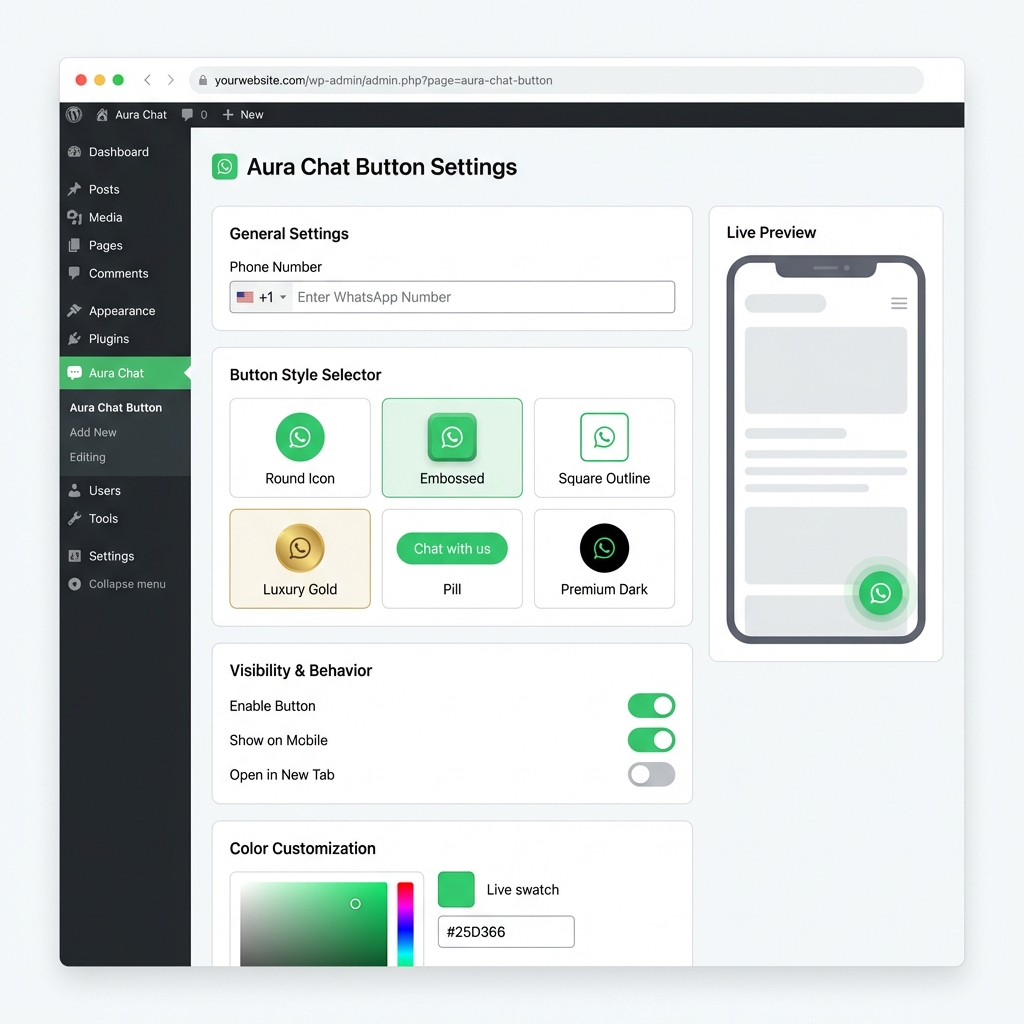
Dashboard overview—general options and messages. 
WooCommerce visibility and page rules. 
Analytics for clicks and trends.
Installation
- Upload the
aura-chat-buttonfolder to the/wp-content/plugins/directory. - Activate Aura Click to Chat from the Plugins screen.
- Open the plugin screen from the admin menu.
- Enter the phone number (with country code) and adjust the button and messages.
- Choose WooCommerce visibility and save.
FAQ
-
Is this compatible with WooCommerce?
-
Yes. It can follow WooCommerce screens and pass useful page context into the conversation.
-
Does image optimization help site speed?
-
Smaller icons load faster. That supports Core Web Vitals and a smoother mobile experience; it is not a guarantee of search rankings.
-
Can I use a business profile for messaging?
-
Yes. The link works with common personal and business setups on the major chat apps.
-
Do you support multiple languages?
-
Yes. The interface is translation-ready, including RTL languages and many locales.
-
Yes. You can set offsets so it does not cover checkout, cart, or other important controls.
-
Can I use more than one phone number?
-
You configure one number in the settings; you can change it anytime or point it to the right agent for your store.
-
Does it open the app on phones and web on desktop?
-
It aims to open the native app on phones and a compatible web experience on larger screens when available.
-
Yes. You can set margins for mobile and desktop independently.
-
Can customers ask about a specific product?
-
Yes. Links from product pages can include context so customers reference the right item.
Reviews


Contributors & Developers
“Click to Chat – Chat Contact Button & Floating Support” is open source software. The following people have contributed to this plugin.
Contributors
“Click to Chat – Chat Contact Button & Floating Support” has been translated into 6 locales. Thank you to the translators for their contributions.
Translate “Click to Chat – Chat Contact Button & Floating Support” into your language.
Interested in development?
Browse the code, check out the SVN repository, or subscribe to the development log by RSS.
Changelog
1.1.8
- UPDATED: Full directory title in readme for search; short “Aura Click to Chat” in the main plugin header for the installed-plugins list (no
all_pluginsfilter).
1.1.7
- UPDATED: Full directory title restored; installed-plugins list shows the short label “Aura Click to Chat”.
1.1.6
- UPDATED: Plugin list name “Aura Click to Chat” and admin menu label “Aura Chat”.
- IMPROVED: Readme metadata (title, short description, tags) for WordPress.org guidelines.
- FIXED: Translation loading uses
Text DomainandDomain Pathheaders only; removed discouragedload_plugin_textdomainusage for Plugin Check compatibility.
1.1.5
- FIXED: Renamed plugin to comply with directory guidelines.
- FIXED: Cleaned up description and removed keyword stuffing.
- UPDATED: Verified compatibility with WordPress 6.9.
1.1.4
- NEW: TinyPNG-level optimization features and clarified admin interface.
- IMPROVED: Faster loading times for better PageSpeed scores.
- UPDATED: Enhanced compatibility with WooCommerce product page triggers.
1.1.3
- NEW: Optimized admin dashboard for a more user-friendly experience.
- IMPROVED: TinyPNG-level asset compression performance for faster loading.
- UPDATED: Verified compatibility with the latest WordPress engine and WooCommerce versions.
1.1.2
- UPDATED: Verified compatibility with WordPress 6.9.
- IMPROVED: Overall stability and performance enhancements.
1.1.1
- NEW: Optimized directory title for better visibility.
- FIXED: Removed growth and bounce animation from Style 5 for a cleaner UI.
- UPDATED: Refined structure for WooCommerce support keywords.
1.1.0
- NEW: Optimized metadata for better WooCommerce integration.
- NEW: Enhanced support descriptions.
- UPDATED: Refined metadata for better chat integration.
- UPDATED: Improved asset loading performance.
1.0.9
- NEW: TinyPNG logic for advanced asset compression and faster loading.
- UPDATED: Better WhatsApp Chat accessibility markers for mobile devices.
- UPDATED: Optimized WhatsApp Support mobile positioning engine.
- FIX: Enhanced Click to Chat link stability for international number formats.
1.0.8
- NEW: Custom Avatar support for personalized WhatsApp Support agents.
- NEW: Live preview for WhatsApp Click to Chat button color customization.
- UPDATED: SEO-optimized WhatsApp Chat for WooCommerce metadata structures.
1.0.7
- NEW: Expert translations for 110+ WhatsApp Chat languages.
- UPDATED: Performance improvements for the WhatsApp Widget front-end script for better SEO.