

Description
The “Broken Link Notifier” WordPress plugin is a vigilant guardian for your website’s links, monitoring and alerting you to broken or dead links as users visit your site. This ensures a seamless user experience and helps prevent search engine ranking penalties.
This plugin:
- Scans content when users visit a page after the page fully loads, preventing performance lag
- Identifies broken links, including 404 errors, timeouts, images, and embedded YouTube videos
- Notifies you via dashboard notifications, email, Discord, Slack and/or Microsoft Teams
- Provides a list of broken links for easy review and correction
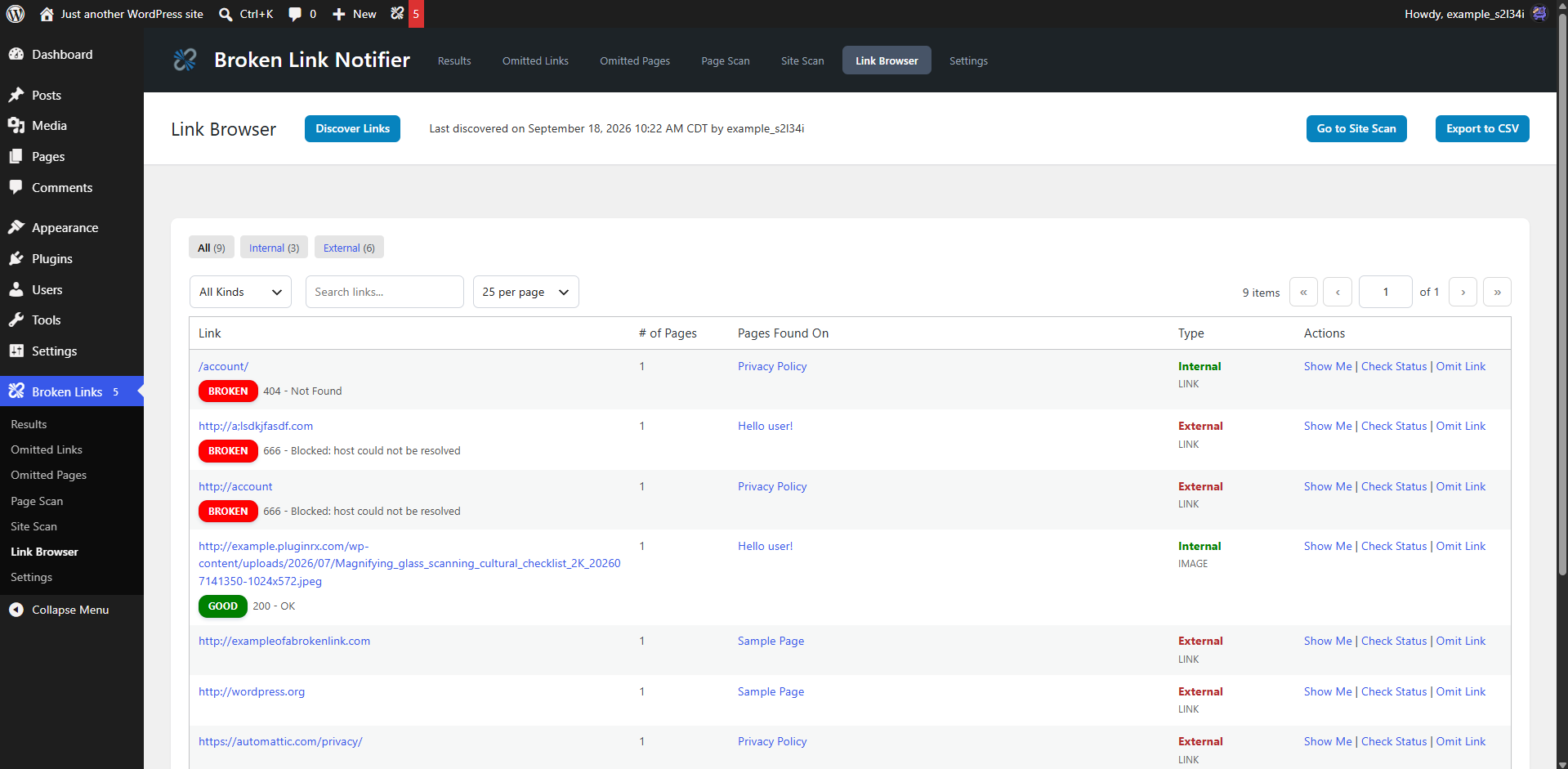
- Lets you browse every link on your site in one searchable table before checking their status (NEW with Version 2.0)
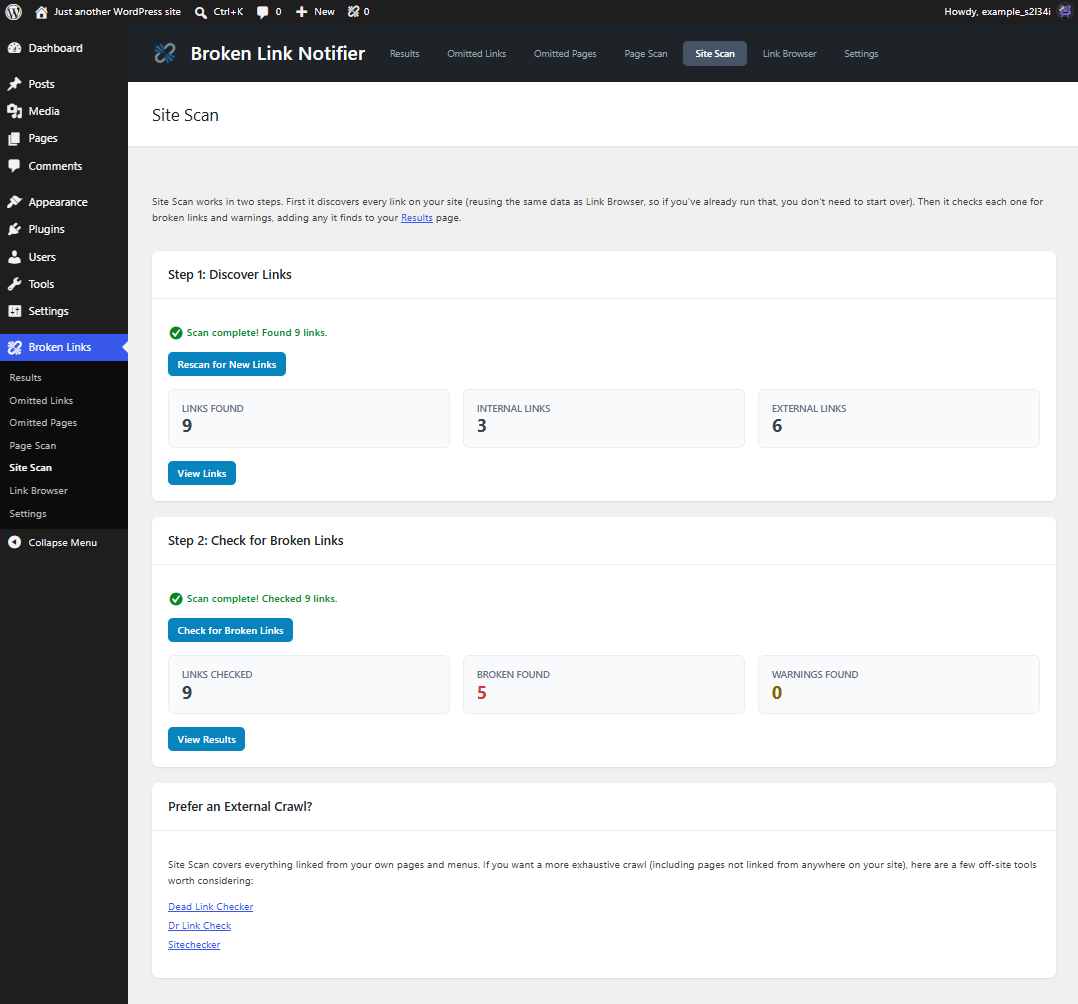
- Runs a full two-step site-wide scan on your own schedule — discover every link, then check them all for broken links and warnings (NEW with Version 2.0)
- Allows easy replacement of links straight from the results page
- Caches working (good) links to skip rechecking them for a configurable amount of time
With “Broken Link Notifier”, you can:
- Ensure accurate and functional links for your users
- Prevent search engines from indexing broken links
- Maintain a professional and trustworthy website image
- Save time and effort in manual link checking
- Discover and catalog every link on your site before you even check them
- Run a full site scan on your own terms, without relying only on page-load visits
- Improve performance by caching successful link checks (optional)
This plugin is a must-have for website owners, developers, and SEO enthusiasts who want to guarantee a smooth and error-free browsing experience for their audience!
IF THIS PLUGIN FLAGS SOME LINKS AS BROKEN WHEN THEY ARE NOT, PLEASE READ THE FAQ BELOW
Demo
Screenshots
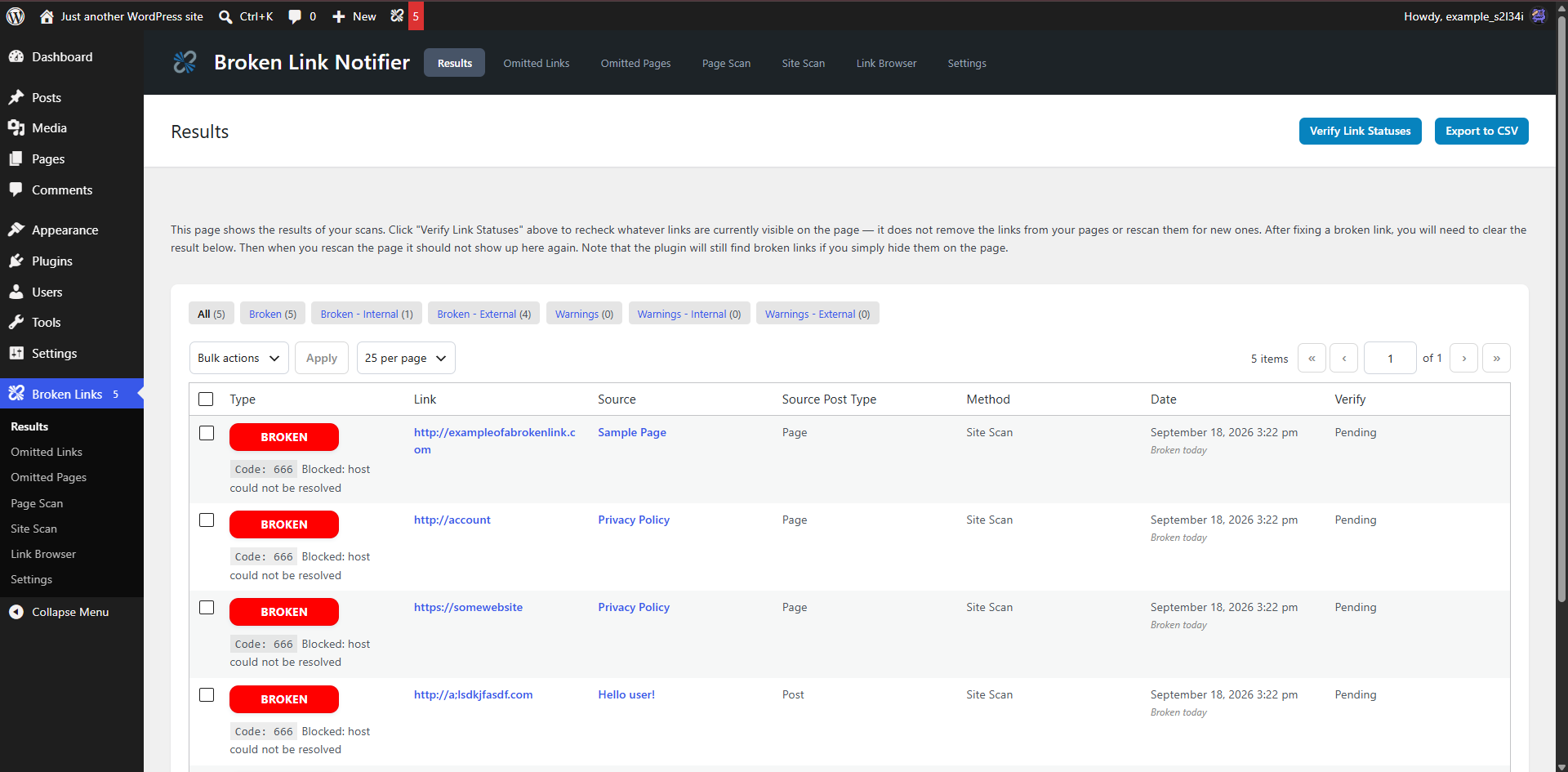
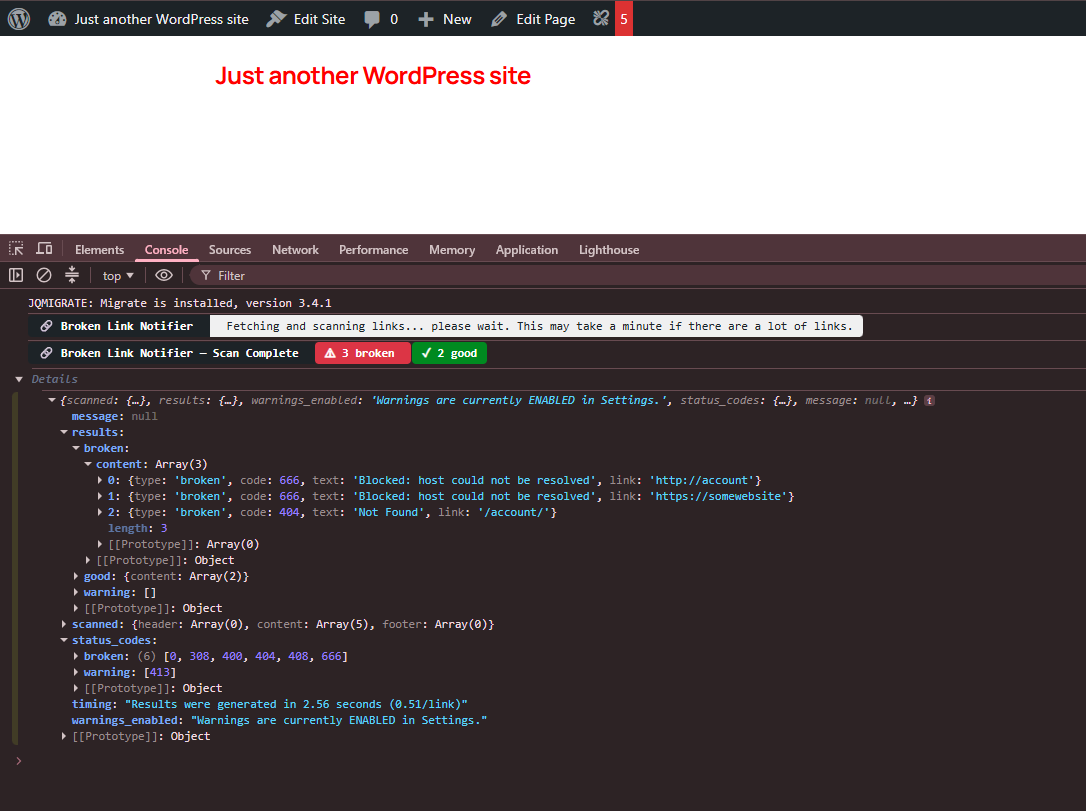
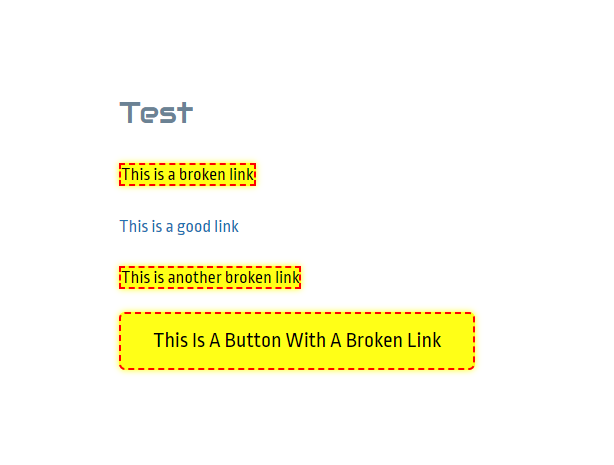
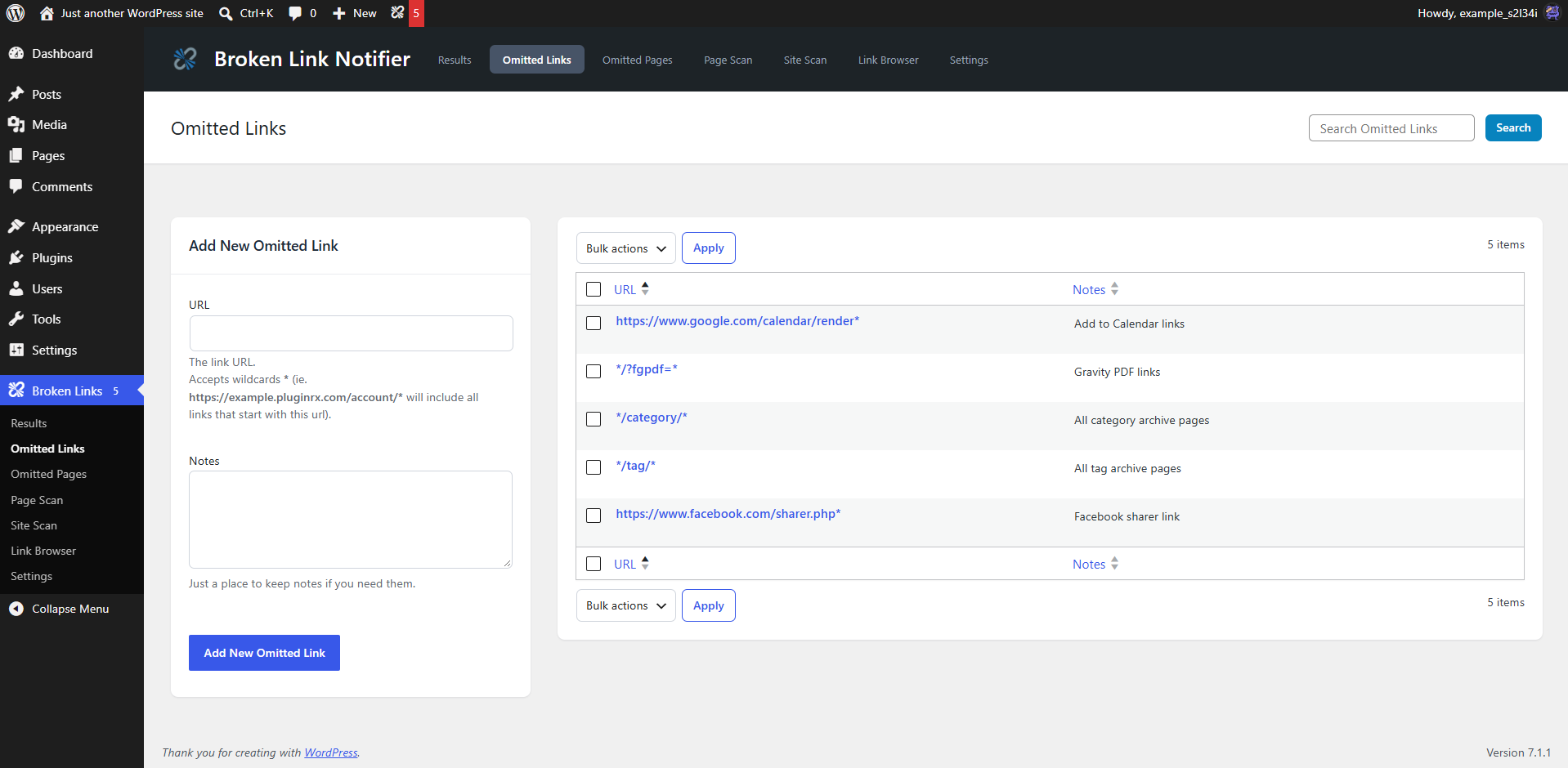
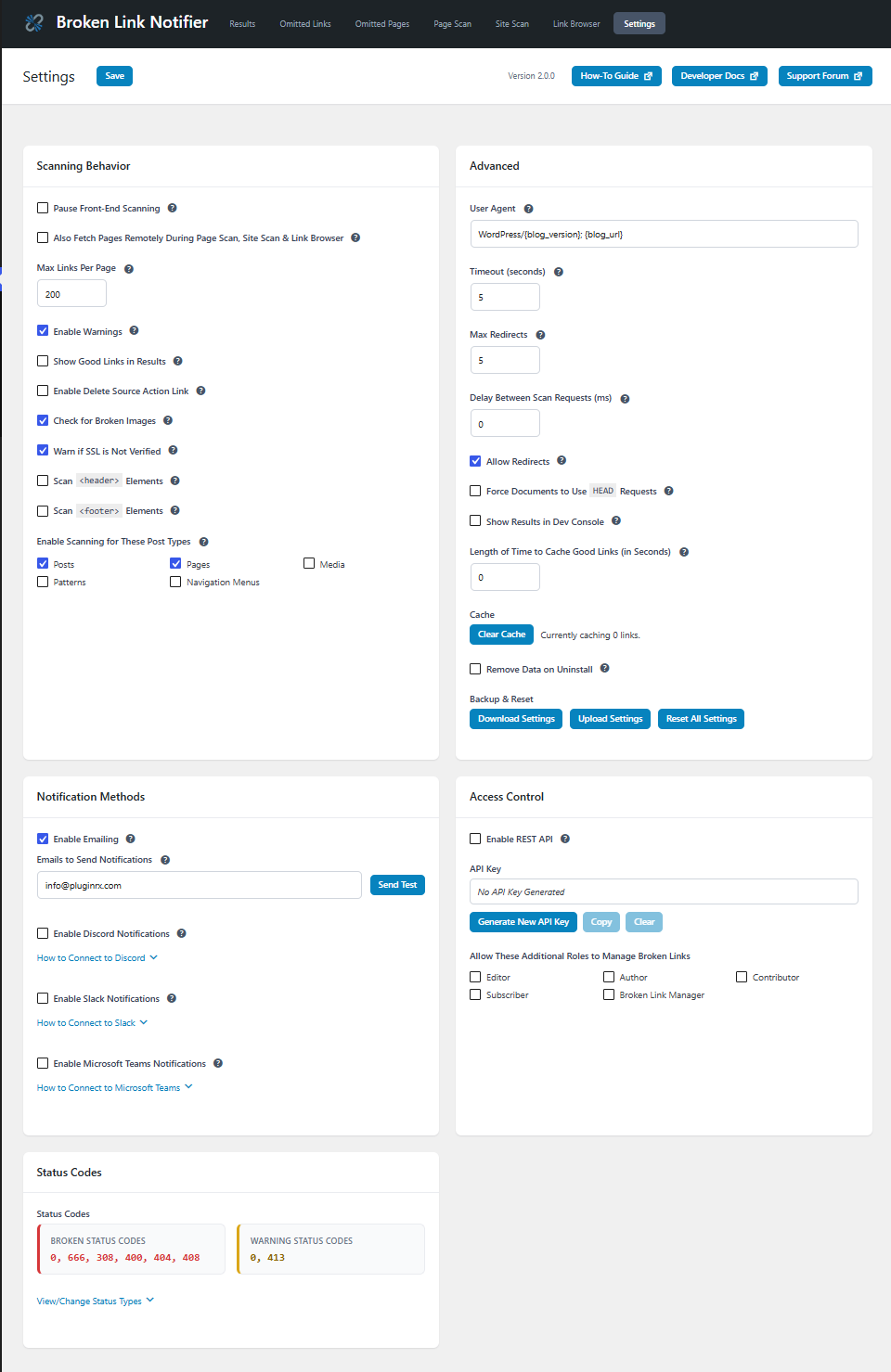
Installation
- Install the plugin from your website’s plugin directory, or upload the plugin to your plugins folder.
- Activate it.
- The plugin works right away just by visiting pages with broken links on them — but you’ll likely see some links flagged as broken that aren’t actually broken, so it’s worth spending a few minutes on setup first.
- Go to
Broken Link Notifier > Settings:- Disable notifications for now. By default you’re emailed every time a visitor finds a newly-broken link; once flagged, a link won’t notify you again unless it’s removed from Results before you fix it. It’s easiest to leave notifications off until you’ve finished the initial setup below, then turn them back on.
- Enable “Also Fetch Pages Remotely During Page Scan, Site Scan & Link Browser” to prepare for a one-time Site Scan.
- Under Post Types, keep Posts and Pages checked, and add any other post types that behave like posts or pages on your front end. Skip post types used only for internal data storage.
- Save with Ctrl+S or the Save button at the top of the page.
- Go to
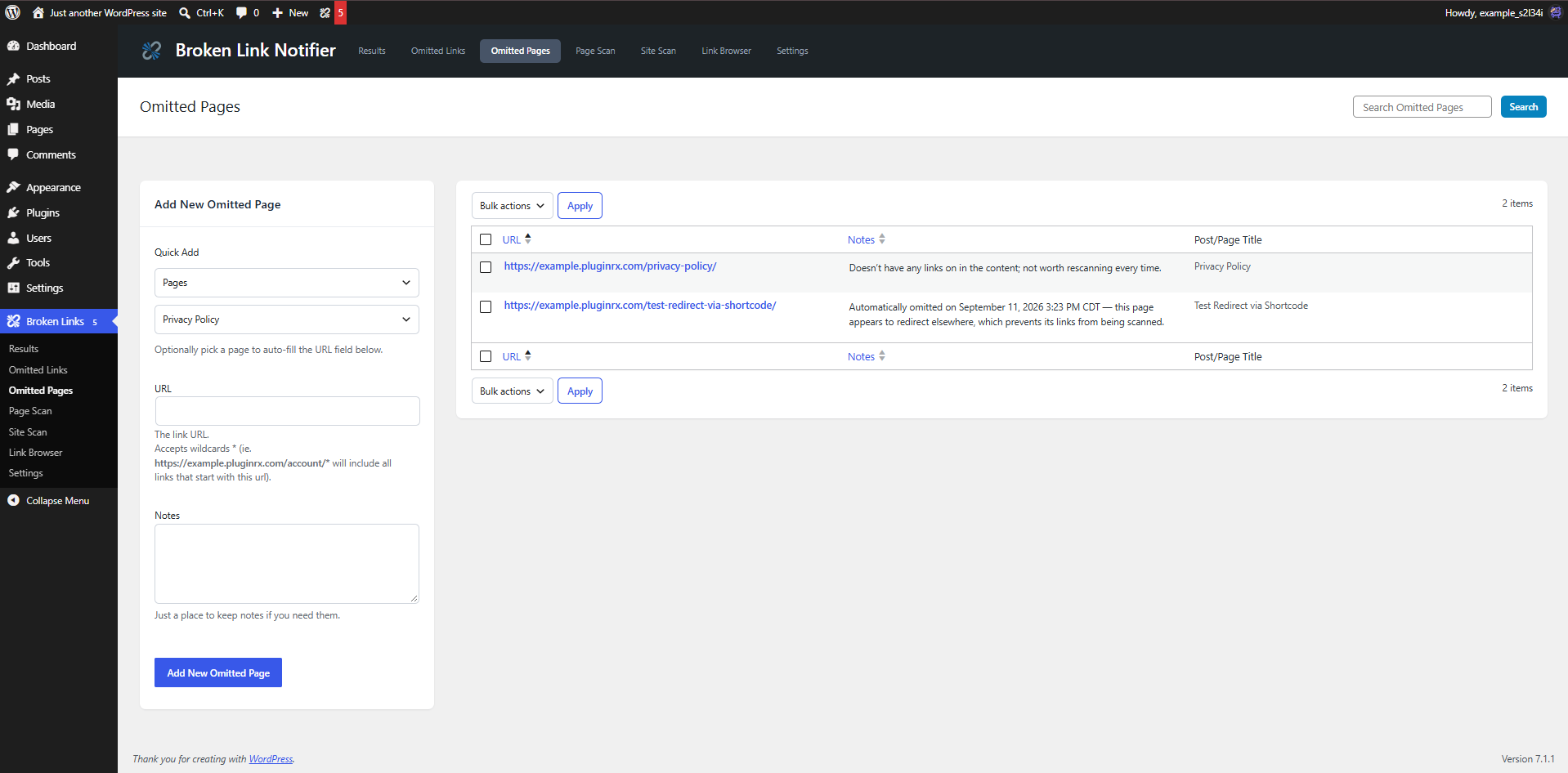
Broken Link Notifier > Omitted Pagesand add any pages that don’t need scanning — custom login pages, 404 pages, auto-generated archive pages, and similar. You can add a note to each explaining why it’s omitted. To omit an entire section of your site at once, use a wildcard, e.g./category/*or/tag/*. - Go to
Broken Link Notifier > Site Scanand run the two-step scan — this checks your whole site up front so you catch issues before your visitors do, and may take a while depending on site size:- Click “Discover Links” and wait for it to finish.
- Click “Check for Broken Links” and wait for it to finish.
- If it finds broken links or warnings, click “View Results” (or go to
Broken Link Notifier > Resultsdirectly).
- Review your results and omit anything that’s a false positive — individually from Results or Link Browser, or by domain with a wildcard from
Broken Link Notifier > Omitted Links. - Once you’ve worked through your initial results, go back to Settings and re-enable notifications so you’re alerted to anything new going forward.
FAQ
-
Will this plugin slow down my site?
-
No — The plugin is designed to have minimal impact on performance by only scanning content after the page has fully loaded for a visitor. This means it doesn’t interfere with the page render or user experience. Additionally, in version 1.2.5, we introduced a link caching option that can further improve performance.
If enabled (via the Settings page), caching good links will prevent the same working links from being rechecked repeatedly for a set period of time. This reduces unnecessary HTTP requests and improves scan efficiency on high-traffic sites.
You can set the cache duration in seconds — common values include:
– 28800 for 8 hours
– 43200 for 12 hours
– 86400 for 24 hoursAdjust this based on your site’s traffic and how frequently your links change.
-
Why do some links show as broken when they are not?
-
If the link works fine and it’s still being flagged as broken, then it is likely either redirecting to another page or there is an issue with the page’s response headers, and there’s nothing we can do about it. If it is a redirect on your own site due to permalink modification, then it’s better to fix the link instead of unnecessarily redirecting. You may use the Omit option to omit false positives from future scans as well. If you are seeing a pattern with multiple links from the same domain, you can go to
Broken Link Notifier > Omitted Linksto add a domain with a wildcard (*), which will omit all links starting with that domain.If you feel that there is another issue at hand, We are happy to look into it further with you.
-
What causes a link to give a warning?
-
Warnings mean the link was found, but they may be unsecure or slow to respond. If you are getting too many warnings due to timeouts, try increasing your timeout in Settings. This will just result in longer wait times, but with more accuracy. You can also disable warnings if you have too many of them.
-
What is status code 666?
-
A status code of
666is a code we use to force invalid URLcode 0to be a broken link in case warnings are disabled. It is not an official status code. -
Can I omit links and pages from scans?
-
Yes, you can omit links from being checked for validity by using the “Omit” link in the scan results, or by entering them in manually under Omitted Links. Likewise, you can omit pages from being scanned from the results page or Omitted Pages. Wildcards (*) are accepted.
-
When I click on “Find On Page,” I cannot find the link. Where is it?
-
Sometimes links are hidden with CSS or inside modals/popups. To find hidden links, go to the page and either open your developer console or view the page source and search for the link. This will show you where it is and which element to look in. Then you can edit the page accordingly. This is more advanced and may require some assistance, so feel free to reach out to us for help.
-
What’s the difference between Link Browser, Site Scan, and Multi-Scan?
-
Link Browser catalogs every link on your site in one searchable table, without checking their status until you ask it to. Site Scan builds on that same catalog and adds a second step that checks every link for broken links and warnings all at once. Multi-Scan is our original scanning method from earlier versions, kept available but disabled by default; developers can re-enable it with the
blnotifier_enable_legacy_multiscanfilter. -
Why does the dev console show more links that what is scanned during a scan?
-
The link count during Site Scan or the legacy Multi-Scan does not include links that are filtered out from the pre-check.
-
What pre-checks are used to filter out broken links?
-
We skip links that start with
#(anchor tags and JavaScript) or?(query strings), non-http url schemes (such asmailto:,tel:,data:, etc. ), and any links you have omitted. -
What can I do if I have the same broken link on a lot of pages?
-
There are other plugins such as Better Search Replace by WP Engine that will quickly replace URLs on your entire site at once.
-
Why does my Site Scan or Multi-Scan stop partway through?
-
There is likely an issue with the content on that page causing a redirect. We cannot intercept all redirected content unfortunately. If that is the case, you can omit the page being scanned so you can continue scanning the rest of your site the next time you try.
-
Are there hooks available for Developers?
-
Yes, there are plenty. You can visit our developer documentation here: https://pluginrx.com/docs/plugin/broken-link-notifier/
-
Where can I request features and get further support?
-
We recommend using our website support forum as the primary method for requesting features and getting help. You can also reach out via our Discord support server or the WordPress.org support forum, but please note that WordPress.org doesn’t always notify us of new posts, so it’s not ideal for time-sensitive issues.
Reviews


Contributors & Developers
“Broken Link Notifier” is open source software. The following people have contributed to this plugin.
Contributors
“Broken Link Notifier” has been translated into 2 locales. Thank you to the translators for their contributions.
Translate “Broken Link Notifier” into your language.
Interested in development?
Browse the code, check out the SVN repository, or subscribe to the development log by RSS.
Changelog
2.0.0
- Update: Complete visual redesign — new shared header, navigation, colors, and content containers to match the rest of the PluginRx plugin family, including inheriting theme colors from Admin Help Docs when installed
- Update: Added a new Site Scan tab — a two-step scanner that discovers every link on your site, then checks them all for broken links and warnings, with live progress and a summary linking to Results
- Update: Added a new Link Browser tab that scans and lists every link on the site, with filtering by internal/external and by link/image/file, search, pagination, and inline “Check Status” and “Show Me” actions
- Update: Legacy Multi-Scan is now disabled by default in favor of Site Scan; developers can re-enable it with the
blnotifier_enable_legacy_multiscanfilter, or by enabling test mode from the Developer Debug Tools plugin - Update: Pages that appear to redirect are now automatically detected and omitted from future scans during Link Browser and Site Scan, with a note explaining why
- Update: Results page rebuilt with AJAX — filter by status with clickable counts, bulk actions (Clear Results, Omit Links, Omit Sources), manual on-demand link verification, and no more page reloads
- Update: Added quick-add tools to Omitted Links (autocomplete from discovered links) and Omitted Pages (browse by post type) so you no longer need to type or paste a URL from memory
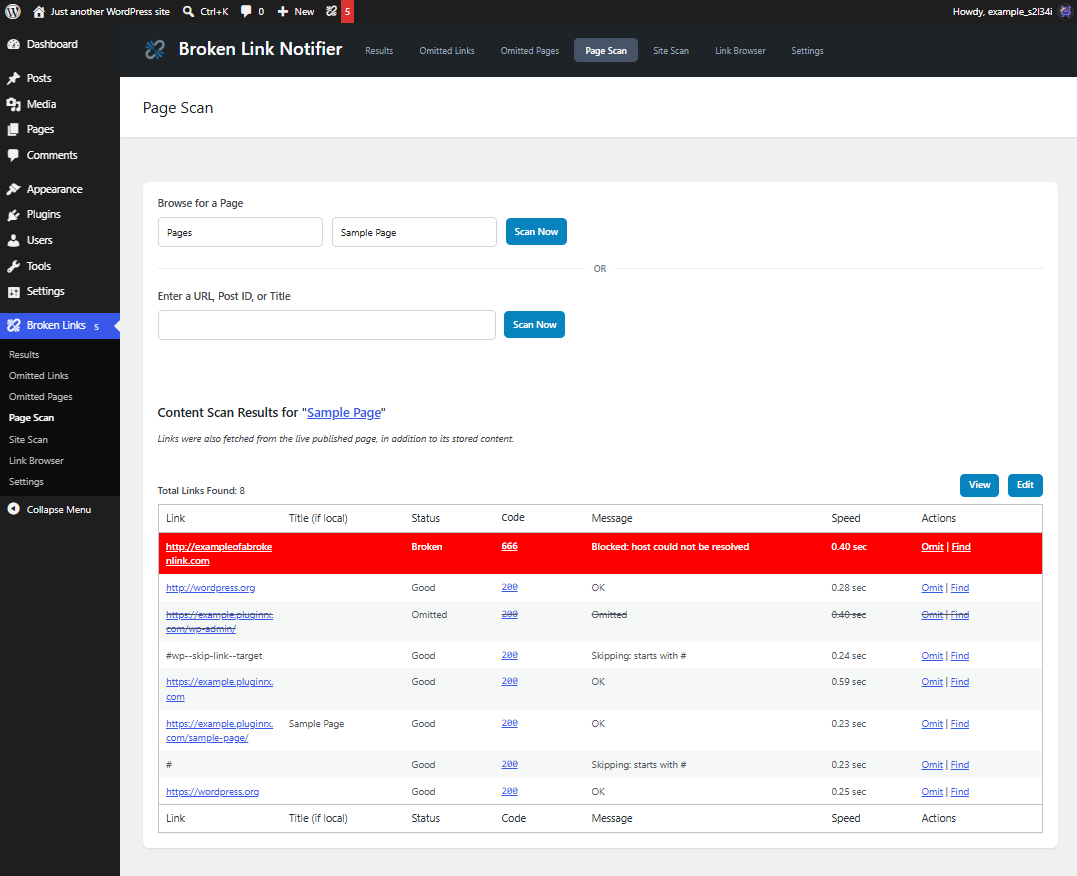
- Update: Added post-type/page browsing to Page Scan as an alternative to typing a URL directly
- Update: Removed the Link Search tab — Link Browser’s own search field covers the same need with more accurate results, including menu items
- Update: Settings page reorganized into categorized sections, saves via AJAX with a dirty-state reminder and Ctrl+S support, and includes step-by-step setup accordions for Discord, Slack, and Microsoft Teams
- Update: Added Download Settings, Upload Settings, and Reset All Settings tools to the Settings page
- Update: Added an option to clear cached good links
- Update: Removed the Export tab; export is now available directly from Results (exports whatever is currently filtered) and Link Browser (exports all discovered links, respecting filters and search)
- Update: Omitted Links and Omitted Pages screens restyled to match the rest of the plugin, with search moved to the page header
- Update: Added quick-add fields and autocomplete suggestions by title to the Page Scan search field
- Update: Added an optional delay between requests during Link Browser and Site Scan scans, for sites needing to reduce server load
- Update: Removed all help documentation since we have links to the Help Guide and Developer Docs on the website
- Update: Added new developer filters —
blnotifier_link_type,blnotifier_link_kind,blnotifier_link_kind_image_extensions,blnotifier_link_kind_file_extensions,blnotifier_menu_location_label,blnotifier_header_footer_links,blnotifier_auto_omit_redirects,blnotifier_auto_omit_redirect_note,blnotifier_export_results_headers,blnotifier_export_link_browser_headers,blnotifier_export_results_rows,blnotifier_export_link_browser_rows,blnotifier_omit_quick_add_post_types,blnotifier_admin_menu_title, andblnotifier_notify_flagged - Tweak: “Omit Page” action renamed to “Omit Source” for clarity
- Update: Shortened the admin menu title to “Broken Links” and made it filterable via
blnotifier_admin_menu_title - Update: Overhauled the front-end console log debugger with better styling, grouping, and more data
- Update: Added a “What’s New” overlay introducing major updates
1.3.8
- Tweak: Added “Broken for X days” note under the date on the Results page
- Update: Added REST API with endpoints for retrieving and deleting results; enable in Settings and generate an API key to authenticate
- Update: Added Slack webhook notifications for broken links
- Update: Added test notification buttons for email, Discord, Slack, and Microsoft Teams
1.3.7.6
- Compatibility: Increased minimum required WordPress version to 6.0
- Compatibility: Tested with WordPress 7.0
1.3.7.5
- Fix: Automatically omit links: /category/, /tag/, /wp-login.php, /wp-admin/
- Fix: Added support for Cornerstone when replacing links from results page
1.3.7.4
- Fix: Added support for Elementor when replacing links from results page (props @nazrinn)
- Update: Added good links and status on console results
1.3.7.3
- Fix: Undefined properties
- Fix: Blog pages that are skipped are showing as an invalid source error
1.3.7.2
- Tweak: Remove links on rescan by ID instead of link hash lookup
- Tweak: Added actual error message to front-end scan if there is an error so we can figure out what the actual problem is
1.3.7.1
- Tweak: Skipping internal pagination and reply links
- Tweak: Performance update to not call get_current_user_id() on every link
- Fix: Reporting sources that don’t exist if bots are trying to go somewhere that don’t exist and get a 404 page without redirecting
1.3.7
- Update: Changed storage of broken links from custom post type to custom database table
- Update: Add option to cleanup on uninstall
- Fix: Error when
blnotifier_link_before_precheckshook returns status
1.3.6
- Update: Added option for Max Links Per Page to help prevent attacks and timeouts
- Fix: Unauthorized access vulnerability (props Nabil Irawan/Patchstack)
1.3.5
- Tweak: Added results page link to the email notifications (props @nazrinn for suggestion)
- Fix: Removed broken link indicator from admin bar if role does not have access
1.3.4
- Tweak: Change “Delete” action link on omitted links/pages to “Remove Omission” (props Diane for suggestion)
- Tweak: Highlighted the admin bar count red
1.3.3
- Fix: Settings error causing missing fields and submit button (props @DLLHell)
1.3.2
- Update: Added support for additional roles to have capability of managing broken links; removed blnotifier_capability hook
1.3.1.1
- Fix: preg_replace() deprecation error (props @venutius)
1.3.1
- Fix: Improper Neutralization of Formula Elements in a CSV File (props @jfriedli/Wordfence)
- Fix: SSRF vulnerability by validating all URLs before remote requests using is_url_safe() (props @jfriedli/Wordfence)
1.3.0
- Update: New support links
1.2.6.1
- Fix: Option in settings to show good links on results page was set to true by default; turned it off
1.2.6
- Update: Added an option in settings to show good links on results page (props to @colnago1 for suggestion)
- Update: Added an export page (props to @colnago1 for suggestion)
1.2.5.3
- Fix: Link search not finding some URLS
- Fix: Undefined array key “min”
1.2.5.2
- Fix: Function wpdb::prepare was called incorrectly. Unsupported value type (array).
1.2.5.1
- Fixes: Sanitizing and unslashing some variables
1.2.5
- Update: Added option for caching good links (enable in settings)
1.2.4.2
- Fix: If no link is found, omit it
1.2.4.1
- Tweak: Updated “Did not pass pre-check filter” error to provide more information
1.2.4
- Tweak: Added minified versions of results-front.js and results-front.css
- Tweak: Removed omitted links and omitted pages hooks from readme.txt since they were moved to their own pages
1.2.3
- Update: Auto-switch user agent for X/Twitter links if a custom user agent isn’t provided
- Update: Updated author name and website again per WordPress trademark policy
1.2.2
- Update: Changed author name from Apos37 to WordPress Enhanced, new Author URI
- Tweak: Optimization of main file
- Fix: Undefined variable $redirect_detected
1.2.1
- Update: Added a method column to the results page
- Fix: Links being added from invalid sources
- Tweak: Links without a source will be automatically removed
- Fix: Some links are being added to results without a source
- Update: Added option to pause auto-verification on results page
- Update: Admin bar count is reduced in real time if results are removed
- Tweak: Update notice on results page from “trash” to “clear” (props @cantabber for pointing it out)
1.2.0
- Update: Added code 413 to warnings and automatically code files larger than 10 MB with 413 when using
GETrequests (allowing redirects option) - Update: Added an option for forcing documents to use
HEADrequests - Fix: Gifs, videos, and other large files timing out (props @mrphunin)
- Update: Added a Replace Link action to link column on results page (props a4jp-com for suggestion)
- Update: Added a Trash Page action to source on results page; must enable it in Settings (props @mrphunin for suggestion)
- Fix: Sometimes no permission for trash error; changed Clear Result action to use ajax instead
- Tweak: Renamed all other action links on link and source columns on results page
- Tweak: Changed Edit link to “Edit Page” (props a4jp-com)
1.1.4.2
- Tweak: Added support for translations on some other info boxes
- Update: Added an info box to the top of the results page with clarification on trashing results
- Fix: Undefined array key “HTTP_REFERER”
1.1.4.1
- Update: Added an option to pause front-end scanning (props @ravanh)
- Update: Added status codes to settings, allowing you to change types, deprecated hooks will only work if codes in settings have no been saved: blnotifier_bad_status_codes, blnotifier_warning_status_codes
1.1.4
- Update: Added field for user agent and option to mark status code 0 as broken instead of warning (props @ravanh)
1.1.3.8
- Update: Allowed max redirects to be 0 to show redirect status code instead of the final status code
1.1.3.7
- Fix: Multi-Scan redirecting if content is not found or if pages have shortcodes that redirect
1.1.3.6
- Update: Added settings for allowing redirects and setting max redirects amount (props @ravanh)
1.1.3.5
- Fix: Fatal error on helpers.php at line 1001
1.1.3.4
- Fix: Fatal error when trying to uncheck all post types in settings (props @ravanh)
1.1.3.3
- Fix: Added support for links starting with // (props pauleipper)
1.1.3.2
- Fix: Added full path to multi scan links to support multisite (props oddmoster)
1.1.3.1
- Fix: Added full path to “Edit” link to support multisite (props oddmoster)
1.1.3
- Update: Added a link search page
1.1.2
- Fix: Warnings from Plugin Checker
1.1.1
- Update: Auto-delete omitted links on Results page
- Fix: Some links not being deleted due to special characters
1.1.0
- Fix: YouTube links showing broken
1.0.9
- Fix: Umlauts in links showing broken (props ralf d)
- Tweak: Removed donate link, nobody donates anyway, working on premium version instead
1.0.8
- Update: Added demo to readme.txt
1.0.7
- Fix: Results page rescan not working on some links
- Fix: Offsite checker links broken XD
1.0.6
- Fix: wp_mail_failed logging error
- Update: Added a string replace for
"×" => "x", which is being converted in images with sizes (ie _100x66.png) - Update: Added a new filter
blnotifier_strings_to_replacefor replacing simple characters
1.0.5
- Update: Added a re-scan verification when loading results page as some false-positives occur with poor connections
- Tweak: Updated plugin tags
- Update: Added other plugins to bottom of help page
- Update: Added an option in settings to include/exclude image src links
- Tweak: Changed default timeout to 5 seconds
1.0.4.2
- Fix: Emailing empty content if already added to results; stopped duplicate emails
1.0.4.1
- Fix: MS Teams integration error with logging
1.0.4
- Fix: Undefined variable on help page
- Update: Added support for checking YouTube video links (props shirtguy72)
- Update: Added support for iframe links (props shirtguy72)
- Update: Added support for image source links
1.0.3.1
- Tweak: Fix minor issues found by WP repo plugin reviewer
1.0.3
- Tweak: Updates recommended by WP repo plugin reviewer
- Fix: Settings saved notification not echoing
- Tweak: Removed links post type and help docs post types if installed
1.0.2
- Tweak: Added nonce to Page Scan JS
- Update: Added Multi-Scan and Page Scan results to results page
- Tweak: Changed “Full Scan” references to “Multi-Scan”
1.0.1
- Deployment